Pages

Category

Techno (122) Gadget (84) Komputer (81) Smartphone (76) Internet (74) Tips dan Trik Komputer (64) Pernak pernik (57) Android (51) Facebook (25) Softwear (22) Computer Virus (20) Game (18) Antivirus (15) Job Application (15) Symbian (15) sex (15) Movie (14) Berita Unik (13) Kesehatan (11) Hardwear (4) BlackBerry (3) Gosip (2) Camfrog (1) Hukum (1) humor (1)

Wednesday, July 20, 2011

Chimo NgeBlog : Review: Hotshot Pool

ou'll know how to play normal pool, of course. And yes, we've got numerous pool variants already on Symbian, of which the best is Micropool, in case you were wondering. But consider what happens at the end of the evening down at the pub, when you've all had a few too many drinks and your friend blocks off a pocket or puts an ashtray on the table and says "Try potting them all now, hotshot!".

Yup, the game just got dramatically harder and with a twist. And this is what Hotshot Pool is based on. On the Easy level, you've just got to pot all the balls. On Normal, pockets start getting blocked off and there's an ashtray placed at random on the table. On Hard, there's also a CUE on the table, plus you lose the object ball aiming aid that's present up to that point.

Screenshot

In addition to these (ahem) obstructions, there are extra rules and caveats. Miss a pot and you lose a life, pot two in one shot and you gain one, and so on. If your lives reach zero, the game's over, of course. And if you pot a ball in a pocket with the right coloured gem in it, you also gain a life.

The rules and modifications are all explained in the game's built-in Help, but be warned that the language is a little 'pidgin' English in places.

Screenshot

And, of course, as you advance through the levels, the initial ball placements change and the obstacles become more awkward. But all of this is just frippery compared if the pool mechanics themselves aren't fun to play.

The nHD screens of current phones are used well, this doesn't seem to be a port from another mobile platform. You aim the cue by swiping the touchscreen in the appropriate direction, while (on the Easy and Normal levels) a red line helps out by showing the direction the object ball will take. Cue power is chosen by tapping and holding the green button at the bottom-right of the screen - just release it when it's showing the power you want:

Screenshot

Lives that are lost (or gained) are animated on-screen, with the current tally shown at bottom-left:

Screenshot

All of which sounds straightforward enough, doesn't it? Unfortunately, compared to the aforementioned Micropool, Hotshot Pool fails spectacularly. Here's why (and grab yourself a coffee, this is a fairly lengthy list of failings...!)

  • The balls don't actually roll. There's no sense of rotation and they simply glide around the table, air-hockey style. This is a compromise that many pool games make to speed up what would otherwise be too sluggish. On its own, this wouldn't be a show stopper. However....
  • Aiming a shot involves dragging the cue aiming line around. Unfortunately, this is tiresome because you can't move it quickly even if you swipe quickly. Changing direction by 180 degrees involves many swipes and you get there eventually. On its own, this wouldn't be a show stopper. However....
  • Fine tuning the aim of a shot is tricky. You can tap tentatively at the aiming line and it adjusts itself.... too far. So you tap or swipe the other side and... it goes too far again. What's needed is a couple of shot aim tuning arrows, just as in every other touchscreen pool game I've ever used. On its own, this wouldn't be a show stopper. However....
  • There's no concept of cue ball spin. This may seem like an advanced option that shouldn't exist in every pool game, but in the real world (and in Micropool) it's the key to better play. Playing every shot 'full ball' is, quite simply clumsy, especially when you're working your way around obstacles and trying to achieve complex aims. On its own, this wouldn't be a show stopper. However....
  • The collision detection around the pockets is wierd. I'll often aim a ball perfectly and it'll bounce off somehow, while at other times the ball will go vaguely near the pocket and sink immediately. On its own, this wouldn't be a show stopper. However....

You get the idea. Add five minor pool gameplay annoyances together and you get something which is close to unplayable and very frustrating.

Hotshot Pool is a good proof of concept game. Now the developers just need to put in the same amount of work again improving the interface and mechanics. And then we'd have a title to be reckoned with.

Steve Litchfield, All About Symbian, 15 July 2011

READ MORE - Chimo NgeBlog : Review: Hotshot Pool

Chimo NgeBlog : Blackberry Bold 9900: Everything you need to know


The Canadian handset maker RIM, has been struggling. The fierce competition from Apple and Google threatens to steal away its corporate client base and its aging handsets don't seem to be helping. RIM's last hope, if we may, taking in consideration the declining shares and the fading reputation lies in the hands of its upcoming device - BlackBerry Bold 9900. Many have speculated that with BlackBerry Bold 9900, Blackberry has arrived with what the world's been waiting for. Know your mobile unravels this super smartphone that is touted to revive RIM's health and wealth.

The BlackBerry Bold 9900 maintains the same familiarity in terms of design to probably the last best device that the company can be given credit for - legendary Bold 9000. Thankfully while keeping the old school basics, the company has married it with the much needed software and hardware upgrades that users have been pleading for since a long time.

Equipped with a 2.8-inch VGA capacitive touchscreen, the Blackberry OS 7, which is the latest version of the RIM's OS will leave you in disbelief. The rocket speed of the OS tuned in with its 1.2Ghz CPU and 768MB RAM - RIM truly looks like has woken up from its slumber.

A architectural marvel, BlackBerry Bold 9900 sports a 2.8-inch VGA capacitive, fast and responsive touchscreen which gives a resolution of 640 x 480 and 287ppi. So, if you are looking for playing back a 720p content, fear not my friend, with Bold 9900 there will be no worries. While the video conferencing lovers maybe a little disappointed with just one snapper in the device, a improved 5 mega-pixel camera, shutter speed and a high-resolution make up for the loss.

The device is high on style quotient as we would have expected it to be. A metal band runs along the phone adding to the premium feel. The metal on the device enriches the phone's look, thankfully not the weight. This light weight device brings in an improved and enhanced voice-enabled Universal Search, HTML5 support, java and most importantly a Near Field Communication (NFC), which makes you go "wallet-free".

The device also packs in a 8GB onboard memory for data storage with additional 32GB of SDHC cards for memory expansion. All in all the device is definitely a step up from most of the RIM previous devices.

While Bold 9900 was supposed to be launched much earlier, it has been mired with delays. Mike Lazaridis, Co-CEO of the company recently announced at the company’s annual shareholders’ meeting that BlackBerry 9900 will be launched in about a month. He also went on to say that the Bold 9900 will mark the largest global launching in RIM’s market history. “It may have delayed us, but we are going to come out ahead,” Lazaridis was quoted as saying. It seems that RIM doesn’t want to leave anything half done and it seems that the handset has gone through 491 approval programs and 191 carriers.

Priced at around Rs 25,000 BlackBerry Bold 9900 is one of seven BlackBerry OS 7 handsets scheduled to hit the market this year.

There is no official word on it India launch though we did come across a rather intersecting thread on the popular blackberry forum, Crackberry where a newbie posted "hey guys, so like I've mentioned my uncle handles RIM's distribution in Eastern India and he had told me that he expects the Bold 9900 to be in his warehouses by the 7-8 of august with a release a week later. Could it be that India is one of the first countries to get the 9900 ?" We wonder if this is true?
READ MORE - Chimo NgeBlog : Blackberry Bold 9900: Everything you need to know

Chimo NgeBlog : Movie Review: 'Winnie the Pooh'


There are two ways to consider "Winnie the Pooh," Disney's newest animated entry based on the beloved works of A.A. Milne. The first is to compare this gentle, hand-drawn effort to the kind of splashy, smart-mouthed, CGI-driven — sometimes 3-D —- juggernauts many have come to expect from animated studio features. On that score, "Winnie the Pooh" is going to seem like an awfully retro, fairly juiceless affair.

But, if judged against its 85-year-old source material and the various features, featurettes, TV shows and direct-to-DVD movies Disney has successfully extracted from it over the last five decades, this current picture — the first "Pooh" installment crafted at the Walt Disney Animation Studios since 1977 — proves a fitting tribute to one of the last century's most enduring children's tales. Either way, this musical comedy's appeal will presumably top out with very young children and the nostalgic parents who escort them, the latter of whom will likely appreciate the picture's ultra-brief running time: 68 minutes including leisurely end credits and an opening, eco-friendly cartoon called "The Ballad of Nessie," narrated by Billy Connolly.

This latest "Pooh," directed by Stephen Anderson and Don Hall with watercolor-rich visuals true to E.H. Shepard's original drawings, was inspired by three stories from Milne's books, which were adapted by a raft of story editors, with veteran Disney staffer and "Pooh" animator Burny Mattinson serving as senior story artist (Pixar-Disney creative master John Lasseter executive produced).

It all takes place during one eventful day in the Hundred Acre Wood, the enchanted forest conjured up by Milne's equitable young protagonist, Christopher Robin (stodgily voiced by Jack Boulter), where the English schoolboy's stuffed animal collection comes to life.

For the uninitiated, Christopher Robin's imaginary menagerie includes impulsive Tigger (Jim Cummings), gloomy Eeyore (Bud Luckey), pseudo-intellectual Owl (Craig Ferguson), fussy Rabbit (Tom Kenny), anxious Piglet (Travis Oates), maternal Kanga (Kristen Anderson-Lopez), her eager young son, Roo (Wyatt Dean Hall) and, of course, that good-natured, honey-obsessed "bear of very little brain," Winnie the Pooh (again, Jim Cummings).

This dizzy, not terribly resourceful group finds itself facing a series of rudimentary obstacles mainly borne out of confusion and a pervasive bent for misspelling. There's a somewhat "Dumb and Dumber" aspect at work here that, frankly, leaves one wishing for a wittier rehashing of life in the Hundred Acre Wood.

Along the way, Eeyore loses his donkey tail and needs a replacement, Owl mistakenly thinks Christopher Robin has been abducted by a concocted monster dubbed a "Backson," and jelly-bellied Pooh tirelessly — and, to be honest, tiresomely — lusts after his elusive honey pots.

It's predictable, painless, occasionally amusing fluff perked up by a clever visual interplay with the book text and John Cleese's avuncular narration.

As for the music, it's largely standard issue, starting with actress-musician Zooey Deschanel's placid cover version of the Sherman Brothers' classic title song (their "The Wonderful Thing About Tiggers" is also featured). Six original numbers by Robert Lopez (from Broadway's Tony-winning "Avenue Q" and "The Book of Mormon," no less) and Anderson-Lopez are sweetly serviceable, if unmemorable, except for the energetic "The Backson Song," which provides for a standout segment.

Be sure to stick around post-end credits, as there's a cute moment that should've been included long before most viewers will probably be in the parking lot.


READ MORE - Chimo NgeBlog : Movie Review: 'Winnie the Pooh'

Chimo NgeBlog : Zeus for Android and fake Kaspersky Antivirus 2011


Over the weekend I wrote about the discovery of the potential Android component of the Zeus information-stealing toolkit (also known as Zitmo).

I wanted to share an update as there are further developments which have been uncovered about the relationship between the Zeus toolkit and Andr/SMSRep-B.

Thanks to Denis from Kaspersky Labs we can now confirm that the fake Trusteer Rapport application is related to malicious websites set up as command-and-control servers for several Zeus/Zbot botnets.

The server-side Zeus application checks for the User-Agent string of the HTTP requests and delivers the malicious payload based on the browser type.

In the case of Android. the default browser User-Agent string will be similar to "Mozilla/5.0 (Linux; U; Android 2.2)..." and from there the operating system can be easily determined.

On a separate note, it seems that the tradition of malware pretending to be legitimate anti-virus software for Android is extending.

After Trusteer, the next target is Kaspersky Labs. Yesterday, I had a chance to analyse a sample of Android malware which attempts to fool the user into installing the package by looking like a legitimate Kaspersky Antivirus 2011 product.

The application package uses an icon similar to the Kaspersky Lab icon, but the actual functionality is far less useful than the functionality of the legitimate product.

When the package is launched the malware attempts to get the unique device id number and transform it into an "activation code". The fake activation code is then displayed in a standard Android view.

Fake Kaspersky Antivirus 2011

In the background, the application installs a broadcast receiver that attempts to intercept SMS messages and send them to a web server set up by the attacker.

Luckily, in the case of this malware (which Sophos detects as Andr/SMSRep-C), the command-and-control web server IP address is 127.0.0.1 (localhost), which does not make the malware very useful.

Clearly, this is just an early test build and we will have to be on watch for the next version which will be connected with a real malicious server.

Although the functionality of Andr/SMSRep-B and Andr/SMSRep-C is quite similar, the code does not indicate that they have been developed by the same author.


READ MORE - Chimo NgeBlog : Zeus for Android and fake Kaspersky Antivirus 2011

Tuesday, July 19, 2011

Chimo NgeBlog : Leaked U.S. Cellular road map shows Android plans


The last time we checked in with U.S. Cellular, the carrier was promising no less than seven Android devices by the end of the year. At the time we had a few clues about possible manufacturers, but we were largely left in the dark as to what to expect. Thanks to a recently leaked road map, however, we now have a clearer picture as to what lies ahead for the nation's sixth largest carrier.

As expected, HTC figures to play a prominent role in the second half of 2011 with two phones and tablet on the horizon. Tech-savvier Android fans will enjoy the Desire 2 (Desire S) while new smartphone buyers might gravitate more toward the entry-level Wildfire S. Both of these handsets should replace current offerings and join the U.S. Cellular lineup at some point in October. Before that, however, the HTC Flyer is expected to arrive in August, presumably as part of a back-to-school offering. The 7-inch tablet and stylus combination could make for a good digital assistant, especially if the price is right.

Bonnie Cha's suspicion that the unnamed Motorola device might be a variation of the Sprint Photon 4G looks to be right on the mark. According to details obtained by AndroidCentral, the Motorola Electrify has identical specifications in the 4.3-inch qHD display, dual-core processor, and 8-megapixel camera. Like its HTC brethren, this guy also joins the roster in October.

U.S. Cellular advised that it would offer one of the "thinnest and lightest" smartphones in the form of an LG device, which now looks to be the Optimus Black. With its 1GHz processor, 4-inch display, and 5-megapixel camera, the LG 855 will make for a gorgeous midrange device when it arrives in September.

The Hauweii Ascend II should be the final Android release in 2011, bringing an 800MHz processor, 3.5-inch display, and 5-megapixel camera a long for the ride. By the end of the year, we'll have dual-core phones with processors clocking in at 1.2GHz or faster, so I don't foresee the Ascend II costing much come its November debut.

As far as which Samsung handset we'll be seeing out of U.S. Cellular, that still remains unclear. We'll find out within the next few weeks as one, the Character, is listed with a July release. Should that not prove to be the Android we're looking for, the Repp will arrive in October. If I were in Vegas, I'd place my money on the latter, possibly in the form of a Galaxy S II model.


READ MORE - Chimo NgeBlog : Leaked U.S. Cellular road map shows Android plans

Chimo NgeBlog : "The Surfer" video game gets PC and PS3 release


"The Surfer" video game will be released for PC and Playstation 3, between October 2011 and March 2011. Bungarra has announced that this surfing game will be the closest thing to being on a surfboard.

The game features a new cast of hardcore surfers, over-the-top levels as well as dynamic in-game cameras that capture and deliver the most authentic surfing videogame experience to date. "The Surfer" delivers the feel of surfing through innovative controls, authentic cameras and incredible levels. Watch a pre-alpha trailer of the surfing game, here.

"Our game offers an arcade based surfing paradise for both surfers and gamers in search of the definitive authentic surfing video game experience," says Andrew West, Development Director at Bungarra Software.

"We’re focused on capturing the actual feeling of surfing with the innovative control system, the physics driven animations and the sharp cameras, all working together to really deliver the closest thing to riding a wave."

The games unique control scheme captures the true feel of surfing, versus the skateboard derivative inspired gameplay of past surfing games. Featuring physics-driven animations, gamers will have a unique gaming experience every time they pick up the controller since no two waves or moves will ever be the same.

"The Surfer" delivers all the arcade fun, creativity and culture of surfing without the years of paddling, duck-diving and big wave pummeling associated with the sport. The new video game has not yet been rated by the ACB, PEGI or ESRB.

READ MORE - Chimo NgeBlog : "The Surfer" video game gets PC and PS3 release

Chimo NgeBlog : WordPress Toolbar For Firefox

WordPress is displaying an admin bar since version 3.1 release that administrators can use to access the blog’s backend when they are on the frontend. The bar displays options to add new contents, edit the current page, open the dashboard, comment moderation or appearance settings of the blog.

I personally dislike the new WordPress admin bar for several reasons. First, it always takes up space at the top of the browser window, which means that the start of the website is pushed down a bit. The admin bar furthermore does not link to all available sections of the WordPress admin interface. If you want to manage plugins for instance, you end up with the same amount of clicks than before.

The WordPress Toolbar is a Firefox extension that resolves those two issues, at least for Firefox users. Unlike traditional toolbars, this one does not add itself to the header area of the browser, which is a good decision. The extension adds a single icon to the Firefox status bar after installation.

A click on the button has no effect on most sites. It only works on WordPress powered sites and only if the user is currently logged in as a user of that site.

When that is the case, a button toolbar is displayed in the upper right corner of the page. This toolbar is displayed both on the frontend and backend of the blog.

wordpress toolbar

The toolbar replicates the full WordPress admin backend sans custom theme related sections. The main buttons lead directly to the sections in the backend. If you mouse over a button you see all available submenu options listed there, so that you can open those pages right away as well.

All options are basically links that point to the section in the admin backend. While that may not be the most comfortable way of integrating the backend in the WordPress frontend, it resolves the issues of the admin bar. WordPress Toolbar links to all sections of the admin interface, plus it does not push down the page with its always visible bar.

Most WordPress administrators may not like the fact that the button in the status bar needs to be clicked on before the toolbar is displayed in the upper right corner. This means that it requires two or three clicks to load the desired admin page. Even worse, admins need to click on the status bar icon at the bottom of the browser screen and then on a button near the top of the screen. It is possible to customize the button to place it in one of the top toolbars of the browser instead to reduce the time it takes to activate the feature.

WordPress administrators who would like to give the toolbar a try can download the extension from the official Mozilla Firefox website.


READ MORE - Chimo NgeBlog : WordPress Toolbar For Firefox

Chimo NgeBlog : Foursquare adds ‘newsfeed’ feature to be more like Facebook


Location-based social networking service Foursquare has rolled out a big new update, adding a newsfeed-like feature that makes the app a great deal more social.

Previously, Foursquare included social networking features like the ability to comment on other users’ check-ins, but it didn’t include a way of letting users know when someone else was interacting with them through the app. Unlike other social networks, such as Facebook, one would have to just drop into Foursquare occasionally to get that information, which meant there wasn’t a lot of incentive to spend time with the app unless the user was actively “checking in” to locations. Check-ins are Foursquare’s method of sharing a user’s current location with other, as well as comments about the location or the activity or event taking place there. The new feature notifies users of comments and check-ins as they happen, according to Mashable, which is not unlike the notifications issued by Facebook’s app for iPhone.

It’s a fundamental change to how Foursquare has previously worked. In the past, Foursquare was mostly about social networking on the move – you could see where your friends had recently checked in, for example, and you could check in at different places yourself in order to sometimes receive discounts from businesses or to just share your activities with others.

With Foursquare adding the newsfeed feature (which it calls its “notification tray”), users can see in real time where other people are checking in and what they’re saying to one another. Getting those updates on the fly could potentially give Foursquare new and different uses – instead of just sharing where one might be and what they might be doing, constant real-time updates could potentially help Foursquare users find new things to do as they’re happening. Or imagine checking into a restaurant and mentioning that you were about to order a dish, only to receive a notification from Foursquare that a friend had left you a comment warning against its spiciness.

The new features made their way to Foursquare’s Android app earlier this month, but just got pushed through for iOS users this week, and among some other improvements, Foursquare now lets users know when their Facebook friends join the location service.

Foursquare has continually made improvements to its mobile apps, which is good news to its 10 million users. While Facebook has already emulated Foursquare with its Places feature, the addition of Foursquare’s newsfeed-like feature brings it more in line with the social networking behemoth – and on more equal footing. As the service continues to grow, it’ll surely gather additional functionality.


READ MORE - Chimo NgeBlog : Foursquare adds ‘newsfeed’ feature to be more like Facebook

Chimo NgeBlog : Movie Review: 'Snow Flower and the Secret Fan'


In trying to give a modern twist to "Snow Flower and the Secret Fan's" bestselling story of women and friendship in 19th century China, director Wayne Wang has been tripped up by his chick-lit tendencies. He should have trusted that author Lisa See's moving portrait of two girls bound by fate, custom and circumstance (as tightly and at times as painfully as the cloth that wraps and warps their feet) would be enough. Instead, he's weighted down the big-screen version with a couple of 21st century Sex in Shanghai-styled BFFs who've had a nasty falling-out.

The film starts with the Shanghai gals and their issues. Nina (Li Bingbing) is involved in a big corporate banking deal and Sophia (Gianna Jun) is in a bad bike accident. The deal would send Nina to New York; the bike incident lands Sophia in the hospital. Nina's choice — whether to stay and repair her friendship or go find her future — drives the rest of the movie.

It also results in the discovery of a manuscript that unlocks the story of Snow Flower and becomes the bridge to See's original tale, which is where Wang should have stayed all along. His vision of the old days and old ways trump the contemporary additions at every turn. It is a rich, ancient world both exotic and erotic and made even more seductive by director of photography Richard Wong, who makes the most of the opportunity to shoot in China.

The central story turns on Snow Flower and Lily, who were paired as laotong — the formal name for such arranged friendships between girls — when they were just children in the early 1800s. It follows them through the trials of their marriages, also arranged, plus forced separations, class differences and rebel uprisings. Throughout it all they stay in touch by sending messages written in nu shu, the secret language of women, on the folds of a fan.

Nina discovers all of this as she reads Sophia's manuscript and reflects on the ways in which their friendship compares with Lily's and Snow Flower's. If the script didn't make the parallels clear enough, Jun plays both Snow Flower and Sophia while Li portrays Lily and Nina. Despite the distance of a couple of centuries, the characters are similar — Snow Flower and Sophia softer somehow, Lily and Nina more pragmatic.

The present is a weird mix of corporate gamesmanship, family conflicts and high-end club hopping. It gets weirder still when Hugh Jackman turns up as Sophia's ex, an Aussie nightclub impresario taking on Shanghai with an embarrassing lounge act.

Ironically it was Wang's choice to have screenwriters Ron Bass ("The Joy Luck Club," "Waiting to Exhale") and Michael K. Ray (Wang's "The Princess of Nebraska") add a modern-day layer to screenwriter Angela Workman's more traditional approach to the novel; Wang said he feels more comfortable with the contemporary. Certainly his films — "Maid in Manhattan" with Jennifer Lopez, "Last Holiday" with Queen Latifah — suggest that. He often comes back to Chinese issues, with his 1993 adaptation of Amy Tan's "The Joy Luck Club" standing as his best, most put-together effort.

With "Snow Flower," the filmmaker is forever torn between two childhoods, two adulthoods, two distinct political and social eras, and two complex relationships, unable to make both equally relevant. When Wang turns to the past — from the look of the film itself to the performances of Li and Jun — the film, and the story, come alive.


READ MORE - Chimo NgeBlog : Movie Review: 'Snow Flower and the Secret Fan'

Monday, July 18, 2011

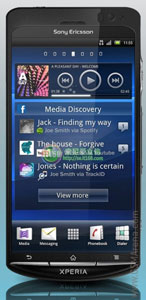
Chimo NgeBlog : 1.4 GHz dual-core Sony Ericsson Xperia Duo press shot leaks


Sony Ericsson seems to be having a hard time keeping their upcoming flagship the Xperia Duo under wraps. We just got another press shot of the dual-core smartphone, along with some juicy rumors about its specs sheet.

According to the source, the Sony Ericsson Xperia Duo possibly uses the NovaThor A9500 chipset, which combines a couple of Cortex A9 cores with the Mali-400 GPU. It's basically the same deal that you get with the Samsung I9100 Galaxy S II, except that this time the CPU clock is even higher.

The other rumored scenario will see the Xperia Duo packing the Qualcomm MSM8260 Snapdragon chipset, which is the one that powers the HTC Sensation.

And the best bit is that an overclocked version of one of the two most powerful currently available mobile chipsets isn't all the Sony Ericsson Xperia Duo can offer. The Gingerbread-running smartphone will also feature an impressive 4.5" qHD screen with the Bravia Mobile engine. The list continues with a 12 megapixel camera and an unbelievable sounding 2500 mAh battery.

As you could imagine, it's way too early to talk about release dates or pricing yet. We are hoping, though that an official announcement will come in the next few weeks.

READ MORE - Chimo NgeBlog : 1.4 GHz dual-core Sony Ericsson Xperia Duo press shot leaks

Chimo NgeBlog : Five of the best system rescue tools


Most malware doesn't intentionally set out to damage your PC, that's bad for business - the authors want their creations to stay hidden, so your system remains infected for as long as possible. But whether it's through programming bugs, partial clashes with antivirus software or other reasons, a serious infection can sometimes trash your PC to the point where Windows will no longer boot. And what do you do then?

Fear not. Here are five free downloads that will allow you to create CDs or USB drives that you can boot your system from as well as letting you locate and remove the malware.

Paragon Rescue Kit 11 Free Edition

Paragon Rescue Kit 11 Free Edition is a professional disaster recovery toolkit that could be all you need to get an unbootable PC working again. The software comes in the form of an ISO file, which the setup program will burn to CD or DVD. Boot your PC from this instead and you'll launch a collection of essential troubleshooting tools.

Norton Bootable Recovery Tool 3.5

Download the Norton Bootable Recovery Tool Wizard via another system, and it'll quickly create a CD, DVD or USB flash drive containing stand-alone Norton antivirus tools. Boot your stricken PC from this, and it'll scan for infections, attempt to remove them and repair any damage, and your system could be back in working order in just a few minutes.

AVG Rescue CD v100.110314a3732

The AVG Rescue CD is a bootable ISO image that comes with a range of tools to help you clean up a virus-infected PC, fix hard drive problems, and get an unbootable system working again.

Burn the disc to a CD, boot from it, and the integrated antivirus engine will attempt to update itself over the internet, or using a local folder. You can then run a full system scan to check for threats. And as any infection won't be active (because you've booted from the CD, not your PC), it won't be able to interfere or hide from the scan, and the chances of a successful cleanup are correspondingly much higher.

Avira AntiVir Rescue System 2011.07.01

Avira AntiVir Rescue System is a Linux-based boot disc that will detect and remove malware from a damaged PC. Booting from a separate CD means that stealthy malware like rootkits will find it more difficult to hide, and you'll have a much better chance of detecting and removing them.

System Rescue CD 2.1.1

System Rescue CD is a mini-Linux distribution on a CD that can be used to recover or repair a broken system. Although it is a Linux system, it can be used to repair Windows computers too, and includes a number of tools specifically for this purpose.

READ MORE - Chimo NgeBlog : Five of the best system rescue tools