Pages

Category

Techno (122) Gadget (84) Komputer (81) Smartphone (76) Internet (74) Tips dan Trik Komputer (64) Pernak pernik (57) Android (51) Facebook (25) Softwear (22) Computer Virus (20) Game (18) Antivirus (15) Job Application (15) Symbian (15) sex (15) Movie (14) Berita Unik (13) Kesehatan (11) Hardwear (4) BlackBerry (3) Gosip (2) Camfrog (1) Hukum (1) humor (1)

Thursday, July 14, 2011

Chimo NgeBlog : Motorola launches XT316 Android smartphone


Motorola has announced the launch of a new Android handset called the Motorola XT316 – also known as the Motorola Fire and Motorola Spice (depending on the region where it’s sold). The phone will feature a candy bar form factor and a full QWERTY keyboard, reminiscent of the BlackBerry. It features a 2.8″ display and will run on Android 2.3 Gingerbread (with MotoBLUR of course).

The Motorola XT316 also features Moto Switch, which will allow users to switch to work or play mode – depending on where they are, so they don’t have to worry about unwanted eyes spying on private work-related files. Other specs include a 3-megapixel camera, a microSD card slot that supports up to 32GB, FM Radio with RDS support, WiFi, Bluetooth, GPS, an E-compass and more. No word on pricing of the phone, but it is now available in China and will reach the rest of Asia and Europe later this summer.

READ MORE - Chimo NgeBlog : Motorola launches XT316 Android smartphone

Chimo NgeBlog : Nokia Nuggets: Nokia E6 review, Nokia Oro Unboxing, reasons to buy the Nokia X7, Nokia N9 hands-on


It's Nokia Nuggets time – our chance to set you up for the week with all the news that's been dominating Nokia's world over the past week. Keep reading for all the highlights.

Things are never dull on NokNok, but we've been kept particularly busy over the past few weeks getting to grips with the Nokia E6, and we started to share our impressions of this superb new Symbian Anna handset in the first of a series of revealing reviews over the past week.

Let's check out what we've been talking about – plus all the other highlights from another busy week of Nokia news – in a bit more detail...

Nokia E6 review

We've had our eye on the Nokia E6, the latest star in Nokia's business phone line-up, for a while now, and now we're putting it through its paces. As usual, we're taking a detailed look at every facet of the phone's makeup – so far, we've taken you through the unboxing and delivered a full blow-by-blow on the new Symbian Anna homescreen layouts, before dishing up a full hardware review, and you can be sure there's plenty more still to come.

Nokia Oro unboxing

The Nokia E6 isn't the only new Nokia smartphone to cross our paths in recent weeks. We've also been graced with the presence of the Nokia Oro – the 18-carat gold-plated cousin of the Nokia C7. Safe to say this one is all about the visual appeal, as we discovered in our unboxing review.

Gaze on Nokia's world in 3D

Nokia Beta Labs continues to deliver exciting and ground-breaking new features for the Nokia faithful to play with, and the latest is Nokia 3D World Gaze, a clever new service that lets you discover more about the world around you simply by pointing your phone in any direction you choose.

Nokia N8 design features

The Nokia N8 remains as easy to look at as the day it was released, and that's largely thanks to its understatedly classy looks. But what are the little details that give the Nokia N8 its enduring visual appeal? We've been exploring just that question by checking out the Top 10 Nokia N8 unsung design features.

The case for the Nokia X7

The cutting edge Nokia X7 is with us, delivering a heady mix of great design, engaging features and of course an early ticket on board the Symbian Anna express. But those aren't the only reasons for putting an X next to this good-looking new smartphone's name – we've rounded up a couple more in our Top 5 reasons to own the Nokia X7.

And finally...

We're not ashamed to say we love the Nokia N9. And so it's with particularly jealous eyes that we've been reading the blow-by-blow from our friends over at Nokia Conversations after spending two weeks with the drop-dead-gorgeous new N Series star. And yes, it's every bit as good as we were hoping.

READ MORE - Chimo NgeBlog : Nokia Nuggets: Nokia E6 review, Nokia Oro Unboxing, reasons to buy the Nokia X7, Nokia N9 hands-on

Chimo NgeBlog : 13 tips for keeping your passwords secure


If there's one lesson to be learned from the rash of hack attacks recently, it's the value of a strong password.

Hacker group LulzSec - after hacking into the websites of the CIA, PBS and Sony - posted on the Internet the email addresses and passwords of 62,000 compromised accounts.

A quick scan of the list showed that most passwords were easy to remember - and easy to crack. Sample: "wildwoman," "coffeecup," "peterp," and "kindle."

Of course, the ideal password would be long, unintelligible and nearly impossible to predict. Like this: !co4D4)f%d. But good passwords are hard to remember, which is why so many people end up with easy ones or reuse the same password for multiple accounts.

Nowadays, passwords are the keys to your digital life, and they safeguard everything from your email accounts to your bank accounts against cyber criminals. Some ways to protect yourself online:

Use mnemonics. Pick a personal sentence, as I did for my college account: "I am an NYU student!" and take the first letter of every word to create a password "1iaanyus!" (NYU requires its students to add a number for extra security. And no, that password doesn't work anymore.)

Know that longer is usually better, but not always. A six-character password such as 7cG&!s is more secure than a longer password that uses a word or a phrase, such as iloveyou.

Change passwords to your bank accounts every few months.

Write down the passwords on a list without user names. Keep it with your passport, car title, Social Security card or other papers you are not likely to lose.

If you can't remember passwords and tend to lose scraps of paper, use password-managing software such as LastPass or KeePass that encrypts and stores all your passwords. Some will automatically plug in your password at the appropriate sites. They're usually free or charge a nominal monthly fee for extra features.

If you want the ultimate protection, consider using a "random password generator" that you can find by doing an Internet search. It'll spit out passwords depending on how complicated you want them to be.

And a few things to avoid:

Never use simple words or phrases, even if you spell them backward and add a number. Hackers have software that can predict commonly used words.

Never have the same password for every account, especially for bank accounts and sites such as Amazon that can store your credit card information.

Never email passwords to yourself. If hackers gain access to your email, they then have everything.

Avoid using personal details. Do not include your name, birthday or home address, which can be easily guessed by someone who knows you.

Don't share your passwords with friends or family.

Don't log into sensitive accounts when using public Wi-Fi.

Remember that no password is completely immune from being cracked, said Robert Rachwald, the director of security strategy at Redwood Shores, Calif., digital security firm Imperva.

The best way to keep your personal information safe is to avoid providing it if at all possible.


READ MORE - Chimo NgeBlog : 13 tips for keeping your passwords secure

Chimo NgeBlog : Review: ShutterPro Premium

Implemented in Qt and using up a fair amount of RAM, ShutterPro Premium gets off to a bad start by taking a whopping 12 seconds from tapping its icon to being ready to take a basic shot. Add another five seconds or so if you want to scroll to and apply an effect. With a little setup as well, you can easily take up to thirty seconds to get your first proper photo - let's hope the subject isn't a person or animal, else it will long since have moved on.

But I'm being a little unfair - ShutterPro Premium's aim is to provide interesting effects and tools for those who want to take their camera phone photography in a new direction - and who have the patience and time available for a not inconsiderable degree of trial and error.
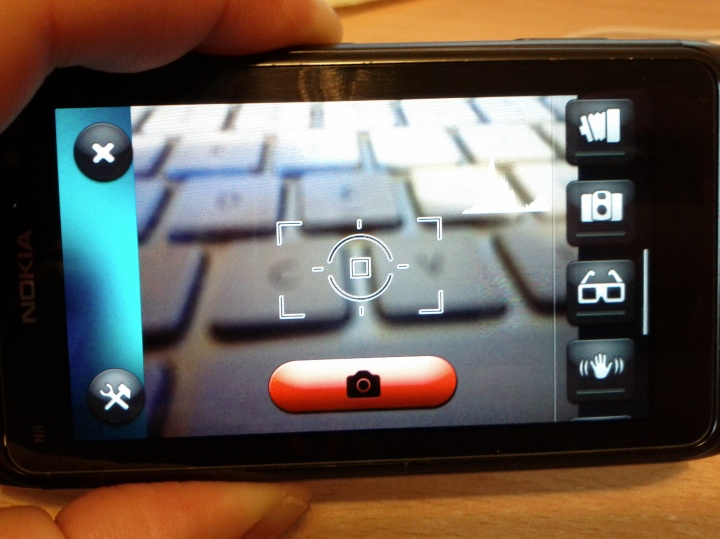
ShutterPro

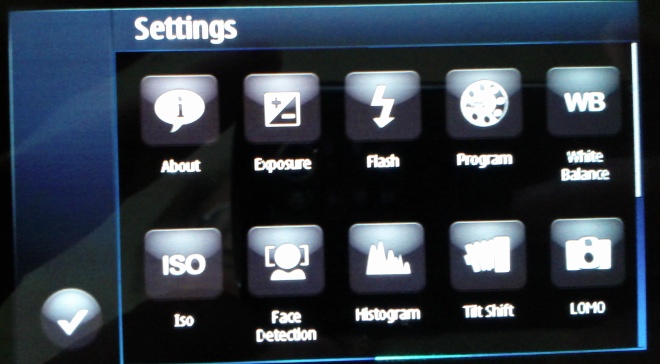
The interface is clear enough and quite well thought out - a shortcuts bar down the right containing every major function, remeniscent of the S60 camera interface from the N95 era, with mock LEDs where needed to indicate which function is on or off. Some are mutually exclusive, some can be turned on in combination.

Each function can be configured through a 'tools' icon at bottom left, I'll list those available below. Although a big red shutter button is presented on-screen, the hardware shutter button on the phone is also recognised, so you've effectively got a choice of which to use.

Top marks then so far for ease of use and an intuitive interface. Working through the camera functions, we have:

  • Exposure (variable up or down 2 stops in 0.3 stop intervals)
  • Flash (as you'd expect: auto, on, off, anti-red eye)
  • Program (like 'scenes' in the regular Camera interface)
  • White balance (again, as per Camera's options)
  • Iso (again, as per Camera)
  • Face recognition (again, as per Camera)
  • Histogram (turns on overall or RGB real time histograms of the image currently in the viewfinder - not that useful to amateurs, but fun to see in action, and shows what the graphics chip inside these new phones can do)
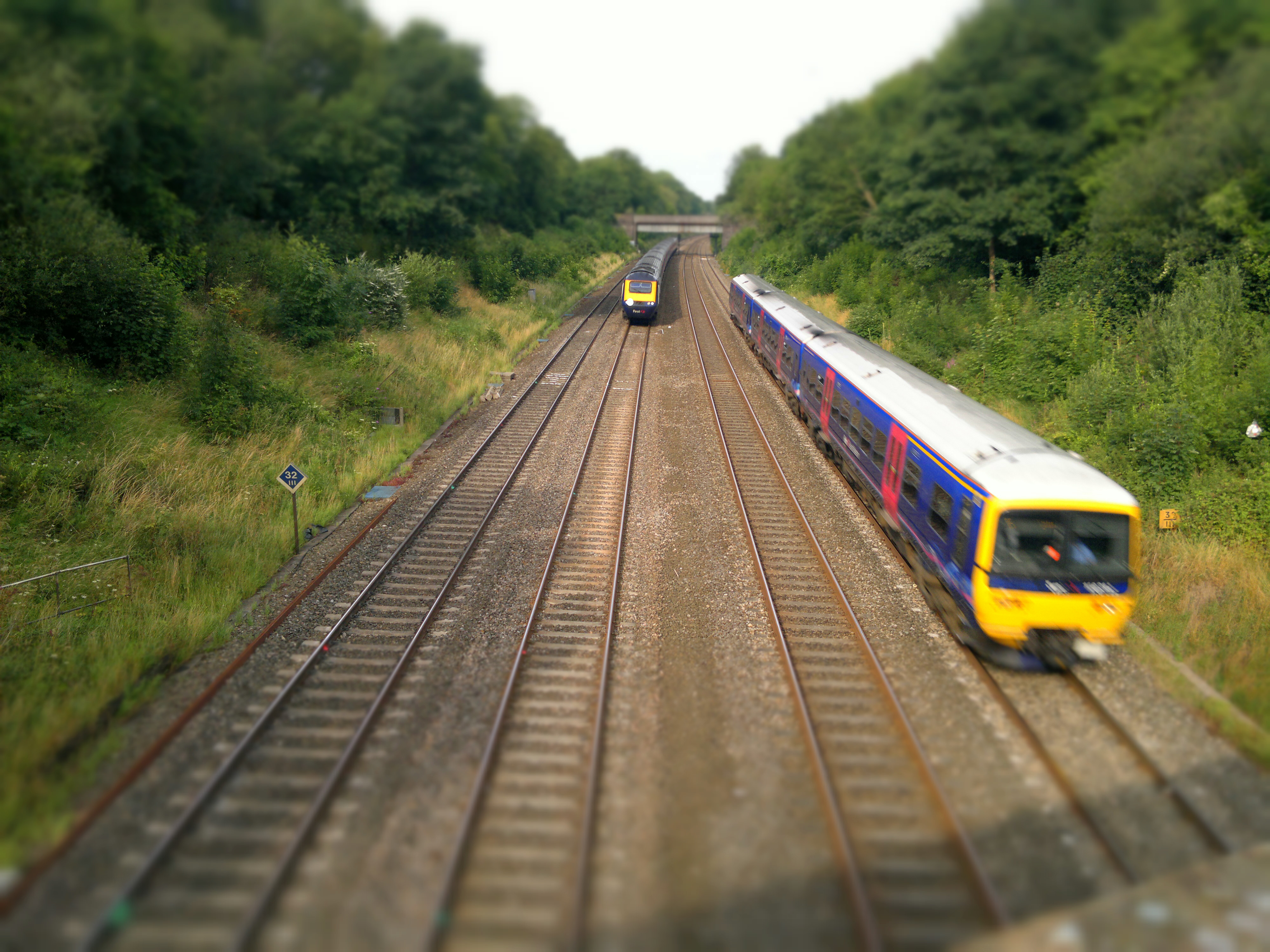
  • Tilt shift (crudely simulates the famous 'make a scene look like a miniature' photographic effect by blurring the top and bottom of the image, with variable results, as we'll see later)
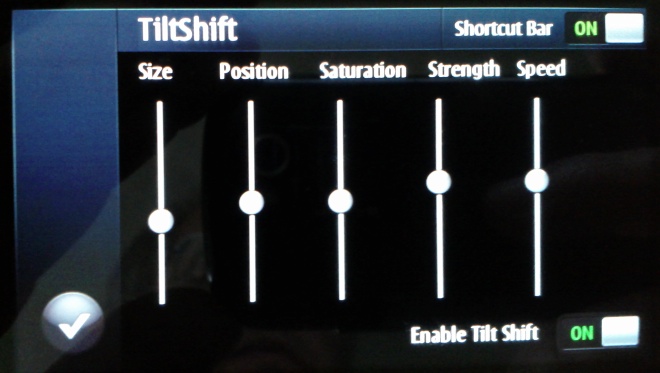
    ShutterPro
  • LOMO (simulates a well known photographic effect originating with cheap Russian cameras. It's a nice effect, but not that usable in real life)
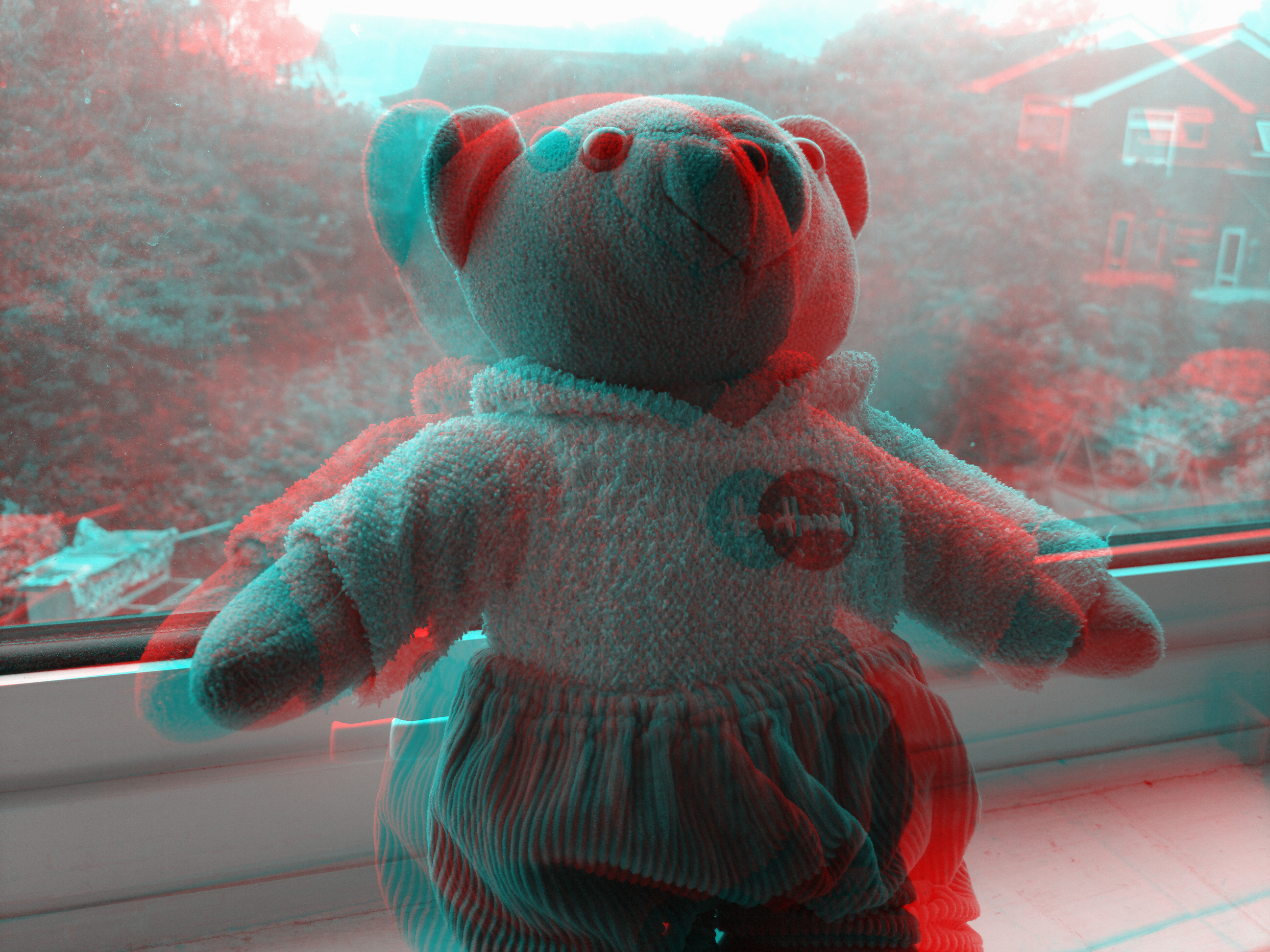
  • Anaglyph (helps you produce red and green images that can be combined into a 3D image for someone wearing the special/famous glasses)
  • HDR (High Dynamic Range, several photos are taken and - in theory - digitally combined into one image that has high contrast in both areas of bright and dark detail. In practice, it didn't work very well, for me)
  • Antishake (as it sounds, presumably using the accelerometer to take a snap when the phone is at its stillest)
  • Delay (as per the built-in Camera application)
  • Cannon (in theory, a 'burst' mode, for capturing quick fire sequences of photos. In practice, at only one per second at best, there's not that much benefit - burst mode needs to be down below half a second per shot if it's to be of any real use)
  • Monochrome (as it sounds)

ShutterPro

In each case there's a complementary settings panel to tweak the parameters, as needed.

A long list above, but taking away the functions which are all implemented in Camera, we're essentially left with a much smaller bunch of special effects - so let's try them out. In each case below, click on the photo to download the original or enlarge more in your browser (as appropriate):

Tilt shift

From Wikipedia:

"Tilt-shift photography" refers to the use of camera movements on small- and medium-format cameras, and sometimes specifically refers to the use of tilt for selective focus, often for simulating a miniature scene. Sometimes the term is used when the shallow depth of field is simulated with digital postprocessing; the name may derive from the tilt-shift lens normally required when the effect is produced optically.

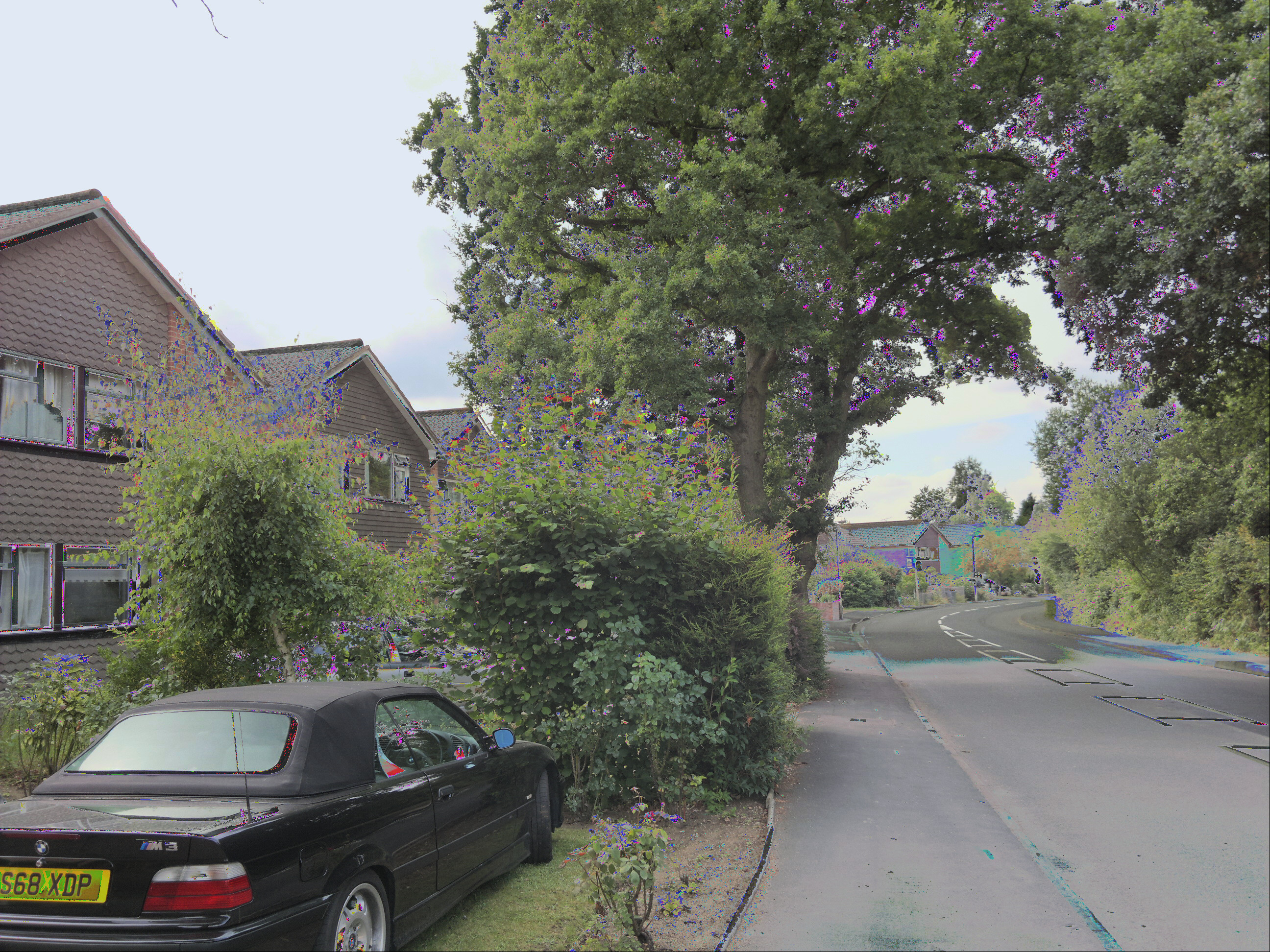
What's not covered by the definition is that for the effect to be appropriate or useful, you have to pick exactly the right subject with exactly the right combination of surroundings, foreground and background. For example, here's a random street scene, snapped with ShutterPro's 'Tilt Shift' - the house in the middle looks a little bit artificial, but the vertical surroundings ruin any effect:
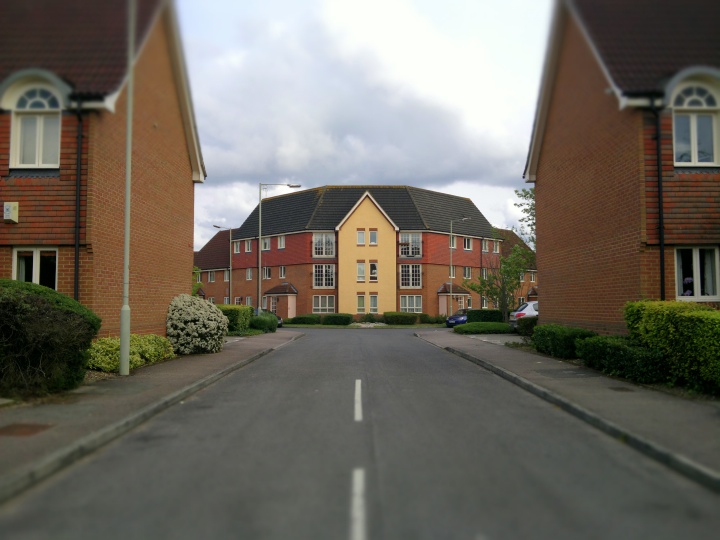
Tilt shift sample, click to download or enlarge

What's needed is a subject in the centre of frame that needs downsizing, with no tell tale clues either side of it, plus detail in the bottom third of the frame (i.e. foreground) and also in the top third (background). Trains are an ideal subject, especially because they're often found as toys or models, making a miniature scene believable. Here's my second attempt, shooting off a bridge:
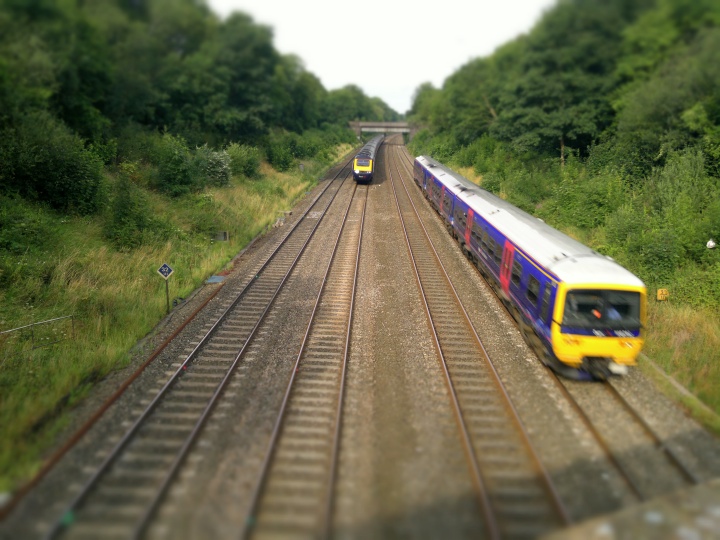
Tilt shift sample, click to download or enlarge

Much better. I said the effect was 'crude' above because the artificial blurring doesn't fade smoothly into the crisp portion but cuts in abruptly. It's not that noticeable in a photo like the one above, but snap something at random and the effect is exposed:
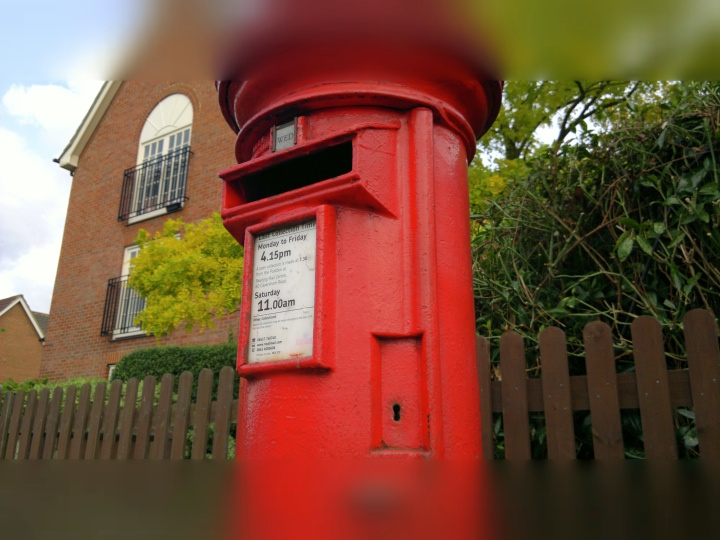
Tilt shift sample, click to download or enlarge

By the way, I was lying about the train shot being my second tilt shift attempt. It was actually about my tenth - there's a huge degree of trial and error involved - but then that's part of the fun of messing with photo effects, i.e. you're not trying to capture a moment, you're perfecting your 'art'!

LOMO

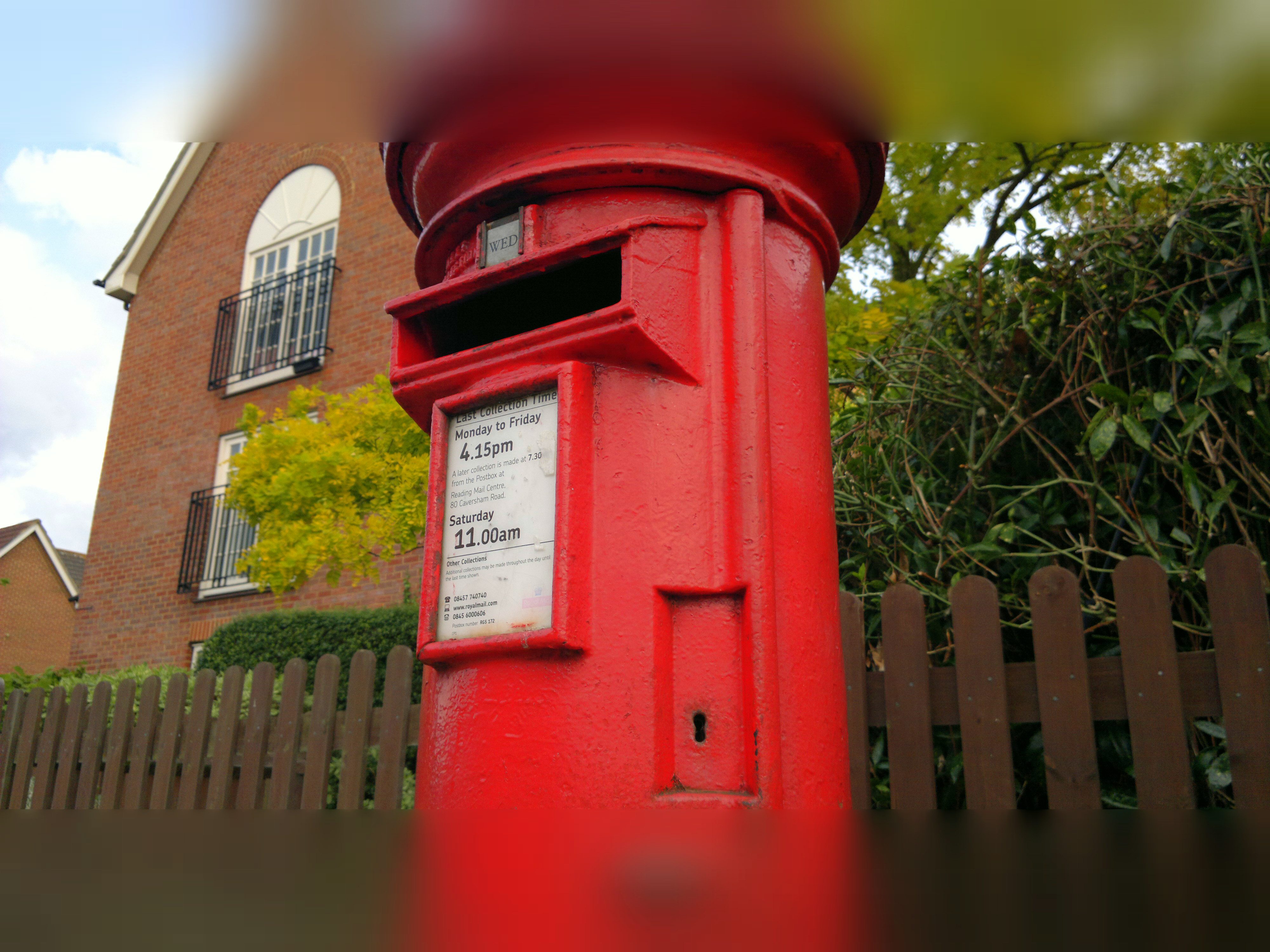
Somewhat easier to achieve, LOMO is a particular fish-eye style effect with "unusual saturation and colour". Think of it as "artistically cheap and nasty"! No setup needed, you just point and shoot. Here's an example:

LOMO sample, click to download or enlarge

It's the sort of modern, arty effect, you might see on the cover page for a magazine feature, but I'm struggling to think of other uses for LOMO in your life. Perhaps as part of a poster, or in the banner of a web page or blog?

Anaglyph

The idea here is to create the typical red/blue(ish) images which combine to produce a 3D image when viewed with traditional 3D glasses. You shoot the first image and then this is put up as a semi-transparent overlay with an offset applied - the idea is to help you line up how far you have to move in order to shoot the second shot. Again there's trial and error, but with a little patience it does work - here's proof:
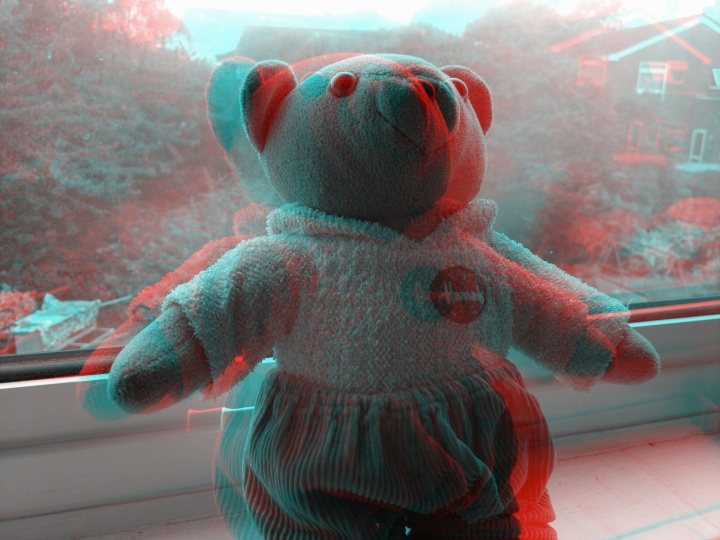
3D sample, click to download or enlarge

Of course, if you haven't got any glasses to hand, then I'm just impressing you with a messed up red/blue blurry mess.....! As with the movie industry, 3D is something of a gimmick - but is still something that's fun to play with.

HDR

We've seen an attempt at High Dynamic Range photos before on Symbian, you'll remember. The idea is to take three photos at different exposures and then combine their best bits to eliminate areas which are over or under-exposed. In practice this is tricky to do, not least because 99% of user photos will be taken without a tripod and so there will some movement of the phone camera between frames (taken with about a second between them). Plus your subjects may well move as well. In the case of trees and flowers, they'll sway slightly in the breeze.

The result, typically, is as bad as this, one of my first attempts at HDR with ShutterPro, showing artefacts from both phone and foliage movement:
HDR sample, click to download or enlarge

Lots of artefacts, then. What's needed is to keep the phone absolutely still and to find a subject or situation which isn't going to change. Heading out with my phone tripod, I snapped this:

HDR sample, click to download or enlarge

Note that the HDR part has worked, in that the dark railway verges and the bright overcast sky are both well catered for. And, to give you an idea of the time between HDR samples, you can see how far the train has moved from frame to frame....!

However, it's worth noting that part of the charm of a realistic photo is that there are big variances in contrast, just as you'd see them in real life. HDR in ShutterPro's implementation, at least, produces workable images that are a little too 'flat' in terms of light and dark. I know this was partly the aim of HDR - to cater for extremes - and in the app's defense, it's probably optimised for sunshine, something I couldn't arrange this week in the UK!

Interface polish

Not mentioned so far but important in the interface is the chance to pick from different parameters after shooting each photo. In the case of the Tilt Shift effect, for example, you can tweak the horizontal line for the effect's centre and can adjust how large the blurred top and bottom sections are. For HDR photos, you get three different photo combinations to choose from. In each case, pick and tweak as needed and then tap on the tick icon to accept. Your final image is then packaged up and you're offered the chance to save it or delete it in disgust(!)

There's an extra option, actually, in a Facebook button which sits on every 'Save' page. I tried uploading several images using this system (I was prompted to log in - successfully - to Facebook on the first attempt) but nothing actually appeared in my Facebook Photos album system, leaving me somewhat perplexed. Maybe a bug, at the very least something for the developers to look into.

Time, memory and resolution matters

I've mentioned above the initial delay when going into ShutterPro Premium. It's really not for casual, instant use! In addition, the application seems to use crazy amounts of RAM - over half the times I tried to launch it, I got a Qt error warning me that RAM was low and that ShutterPro might be unstable - even with nothing else major running on my N8. I realise that 12 megapixel images are being manipulated and that this will require tens of MB of RAM, but I still struggle with the idea that the N8 will physically run out of RAM. Surely there's extra optimisation possible within ShutterPro?

As things stand, you have to shut everything else down before starting ShutterPro, adding further to the time needed to get it going.

I mentioned resolution above - most ShutterPro operations work at the full native resolution of your phone - 12 megapixels in the N8's case, 8 megapixels in most other cases. However, processing time constraints limit the Anaglyph and HDR effects to 5 megapixels. Still plenty, of course, but worth noting.

Also worth noting is that all of the effects above were with default settings - the only things I fiddled with were the tilt shift baselines, to match my subject. Most of the advanced settings in ShutterPro are beyond me - which means they'll probably be beyond most other users too. If you understand them all then go ahead, knock yourself out and have fun!

_________________

There are two questions to answer here. One, is ShutterPro Premium worth £3 of your money in the Ovi Store? Absolutely - as the owner of an expensive smartphone, this is only a few pounds more and will give you a lot of fun trying the effects out and, who knows, you may stumble across a shot/effect that works out stunning and gives you a lot of satisfaction? There's also a 'Lite' version in the store, for free, letting you try out the interface and standard functions, though only the premium version has the effects reviewed above.

So yes, BLStream has put a lot of time and effort into the application so far and it deserves some recompense by way of sales. On all Symbian^3/Anna devices, not just the N8, since I can't see why (a few settings aside) ShutterPro wouldn't work with EDoF cameras too.

The second question is whether ShutterPro Premium is good enough to stick around on my personal Nokia N8? Reluctantly, no. The launch time, processing time and RAM restrictions all mean that it would get in the way too much, when compared to the far faster, more efficient and more nimble built-in Camera application. If I could think of a real world use for its effects, other than just 'fun' then maybe I'd change my mind - but ultimately, despite its mirroring of all the 'serious' camera parameters from Nokia's version, ShutterPro Premium boils down to its effects and there's just not a lot of call for tilt shift, LOMO or 3D in my world. HDR would be great if it was foolproof, but I'm sorry, I don't carry my tripod everywhere with me.

A mixed bag then. Hopefully, after numerous examples and 2100 words, you've already decided whether ShutterPro Premium is for you.

Buy Link | Download / Information Link

READ MORE - Chimo NgeBlog : Review: ShutterPro Premium

Chimo NgeBlog : Facebook Releases 'Facebook for Every Phone' App

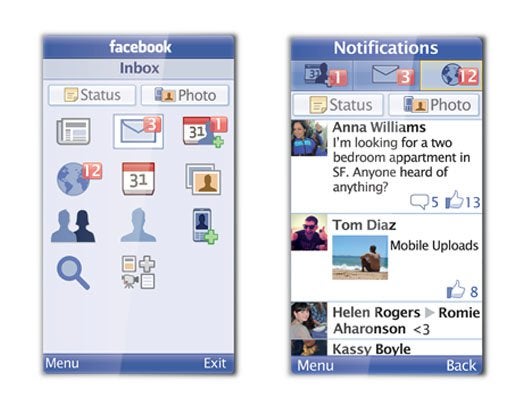
Facebook may be building a secret HTML 5-based site for the iPad and other advanced devices, but the company hasn't forgotten that the majority of Americans still own a feature phone. Facebook announced late Tuesday a new downloadable app called Facebook for Every Phone that brings a smartphone-like experience to lesser handsets. The new app works with more than 2,500 Java-enabled feature phones, and includes the usual Facebook trappings such as the News Feed, message inbox and photo viewing.

Facebook for Every Phone also includes the ability to upload photos to the social network and discover new Facebook friends from your phone's contacts. The company says the new app has been designed to use less data than other Java apps or mobile sites.

Facebook Releases 'Facebook for Every Phone' App

To entice people to use Facebook for Every Phone, the company has partnered with several cell carriers worldwide to offer free data usage for the new app for the next 90 days. The bad news is, Facebook hasn't partnered with any U.S. carriers for this offer. The free data plan appears to be largely a play for international users in places such as India, Russia, Indonesia and the Philippines.

Feature phones reign in U.S.

Although smartphones are becoming increasingly popular in the United States, feature phones are still more widely used. About 38 percent of U.S. mobile handsets are smartphones such as the iPhone, Android and Blackberry devices, according to a recent Nielsen survey. That means 62 percent of Americans are still opting for less expensive flip and candy bar phones to stay connected while on the go.

That may soon change, however, as Nielsen says 55 percent of new cellphone purchases between March and May of this year were of the smartphone variety.

If you're part of the declining feature phone majority you can grab the new app at d.facebook.com/install or from app stores such as GetJar, Appia and Mobile Weaver.

READ MORE - Chimo NgeBlog : Facebook Releases 'Facebook for Every Phone' App

Chimo NgeBlog : New Nokia Handset Sporting Symbian Belle Gets Leaked

Credit to the guys over at KnowYourMobile. They claim that they have received leaked photos of a No

kia smart phone named Zeta, which apparently is one the new Nokia phones that will run the Symbian Belle OS (successor to the Symbian Anna) on a 1 GHz processor.

According to KnowYourMobile, the device will sport a 3.2 inch AMOLED screen with an HD resolution of 640×360 pixels, possess two cameras (a primary 5 MP camera on the rear and a VGA one on the front), offer standard connectivity options like Bluetooth, Wi-Fi, 3G, expandable memory upto 32 GB via a MicroSD card and will allegedly carry off dimensions that will allow it to be called the thinnest smart phone in the world.

Nokia has lost considerable ground in the smart phone war in the recent past, and will be hoping that apart from its collaboration with Microsoft and Windows Phone 7, handsets like Zeta will help it regain some substantial ground in the affordable smart phone segment. Their main bet will be on the Symbian Belle OS, which may be expected to do well after the generally positive response to Symbian Anna.

There is no information regarding the pricing of the device, which is a shame, as the success of the Zeta and other similar devices that
READ MORE - Chimo NgeBlog : New Nokia Handset Sporting Symbian Belle Gets Leaked

Chimo NgeBlog : Movie Review: Killer Performances Carry 'Horrible Bosses'


Horrible Bosses takes a thin premise and milks it for all its worth, riding a witty script and super-strong cast to comedic glory.

Sure, just about every character in the movie is cartoonish, and the script is full of glaring logical lapses, but the performances and jokes are all uniformly solid. Other than Bridesmaids, it's the funniest movie of the year (so far).

The plot is yet another itineration of Hitchcock's Strangers on a Train and its 1980s comedy remake Throw Momma From the Train—both mentioned by name, just as the latter namechecked the former—filtered through Great Recession career anxieties.

Jason Bateman, Jason Sudeikis and Charlie Day are three workaday guys suffering under the torment of titular awful bosses: Kevin Spacey as Bateman's tyrannical company president; Jennifer Aniston as the dentist to Day's assistant, who subjects him to constant sexual harassment; and Colin Farrell (with a bald cap and prosthetics), supervising Sudeikis while living a Charlie Sheen-like coke-and-hookers lifestyle.

The three men, despite numerous other, better options available to them, decide to kill their workplace tormentors. The movie's great (if unoriginal) joke is that these bumbling fools lack the daring, smarts and street savvy to pull it off. A premise like this could easily run out of steam quickly, but it doesn't, mostly because the jokes are so strong, and the actors deliver them so well.

Bateman and Sudeikis play versions of their usual personas, but the breakout here is Day, best known from It's Always Sunny in Philadelphia (on which one of his costars is Throw Momma From the Train director/star Danny DeVito). He does a lot of his chaotic Sunny schtick here, from high-pitched squealing to getting out of tight spots by pretending to be a lawyer, but I get the sense that he's going to be headlining Hollywood comedies in a year or two.

Spacey gives an entertaining performance, sort of an even more deranged version of his character from the mid-'90s movie Swimming With Sharks, while Aniston is the funniest she's been since the early seasons of Friends. Farrell is hilarious, too, in a pretty brief role, and there's even an entertaining part for Julie Bowen (from Modern Family).

Jamie Foxx is also on-hand in a two-scene role as a guy facilitating the murder. I won't spoil it, but he has probably the funniest character name since McLovin. And there are two different cameos that The Wire enthusiasts are going to love.

Horrible Bosses was directed by Seth Gordon, whose last two films were wildly divergent: The amazing 2007 documentary The King of Kong: A Fistful of Quarters, which was about two guys fighting each other to break the world record in Donkey Kong (seriously, check it out on Netflix), followed by the abominable 2008 Vince Vaughn/Reese Witherspoon comedy Four Christmases.

He's also done episodes of The Office, Parks and Recreation and Modern Family; this film is much closer to that style, and level of humor, than his previous comedy.

Sure, the plot has many holes in it—the characters plan to kill someone by poisoning his cocaine, while calling the cops on him for said cocaine would solve their problem more easily. Yes, it's sort of hard to root for a murder plot, but Horrible Bosses succeeds in delivering consistent laughs, which is more than I can say for most comedies these days.

READ MORE - Chimo NgeBlog : Movie Review: Killer Performances Carry 'Horrible Bosses'

Wednesday, July 13, 2011

Chimo NgeBlog : Samsung unveils latest SyncMaster 3D LED monitor


Samsung Electronics Philippines Corp. (SEPCO), a leader in consumer electronics and information technology, has introduced Samsung SyncMaster SA series 3D LED monitors, which bring consumers to a new era of 3D entertainment.

“3D elements have been integrated into different products, especially in movies and video games. The craze is sweeping all over the world. In order to elevate consumers’ visual experience, we are now launching the first Samsung SyncMaster SA series 3D LED monitor. Users can get very well prepared for upcoming 3D movies, 3D video games and other 3D contents. Samsung will bring users to the next level of unique 3D experience,” said Eric Sulit, SEPCO director for IT business.

Samsung has strengthened its No. 1 position in the global monitor market with more than 6.21 million units sold in the first quarter of 2011 and has topped the global monitor market for 19 consecutive quarters since the third quarter of 2006.

Real-life 3D pictures

In order to strengthen its market leadership, Samsung unveiled the Samsung SyncMaster SA950 3D LED monitor. By adopting 3D HyperReal Engine, the reaction is particularly fast, enabling the monitor to produce vivid 3D images without dizziness. The new product is equipped with Ultra Clear Panel, which enhances color contrast for sharper images.

Utilizing Samsung built-in emitter and 3D Active Glasses (which support images of resolution 1920 x 1080), images will appear more vibrant and noticeably brighter than using traditional passive (polarized) glasses.

Its wide range of inputs, from AV content to 3D connectivity such as DisplayPort, HDMI and DVI, will facilitate the monitor to be more compatible in enhan-cing users’ experience.

At the push of a button, the Samsung 3D Converter transforms users’ favorite 3D photos, movies or games from 2D to 3D images. And with the 3D visual adjustment feature, users can even customize the 3D experience to match their particular needs, giving them a new level of visual comfort. Like other Samsung’s monitors, it is equipped with Samsung’s unique color engine to produce vivid images.

Elegance of nature

Samsung’s patented Touch of Color (ToC) design is inspired by the elegance of nature. The glass-like finish is reminiscent of a fading sunset, while the crystal-clear acrylic stand adds style and sophistication.

Samsung SA950 series monitor is lead-, mercury-, freon- and VOC-free and no volatile organic compounds have been emitted during its manufacture. On top of that, its exterior is 100 percent recyclable. It enhances the work environment while protecting the environment.

For the Samsung SA950 series, the asymmetric frame and integrated curve design create unexpectedly stunning aesthetic value and unique beauty. The strong contrast between black at the front and sliver at the back offers an indelible impression. And the “Real Mental” material rolling down to the stand delivers premium and modern sentiment.

Smart features are reflected in the refined design, with stand tail for cable arrangement, and cables are hidden behind the monitor to keep the desk neat and clean.

Samsung Eco Motion Sensor

The Samsung SyncMaster SA series is equipped with Eco Motion Sensor. This function helps conserve energy — the motion sensor can detect body heat of the user in front of the monitor. The monitor can then be automatically switched on and off accordingly.

The Eco Light Sensor is another energy-saving feature that can detect the amount of surrounding light to automatically adjust the brightness of the screen.

For instance, when the monitor is placed on the window side, it will increase the brightness of the screen so as to minimize glares. And when the surrounding light is back to normal, the brightness of the screen will automatically turn back to normal so users’ eyes are viewing the content at a comfortable level. This function results in reducing eyestrain and power consumption.

Zero-bright spot for Samsung monitors

Apart from design and image quality, bright spot is another important factor for consumers when choosing monitors, which may affect their experience. Samsung devoted great effort in providing distinguished quality and excellent user experience to consumers. Thus, a “zero-bright spot” guarantee serves as a promise to customers along with the three-year free standard warranty.

Diversified ‘Magic’ functions

The SA950 series is consistent with other Samsung SyncMaster monitors with exclusive features of “Magic,” including:

• Magic Angle: Users can enjoy a pre-set angle of display with the best contrast and glowing screen even when they are not facing the monitor. It fits users’ different usages of monitors, particularly those who need to use multiple monitors simultaneously.

• Magic Color: With the advanced intelligent color optimization technology, it conducts an auto-analysis of incoming RGB light signal, thus optimizing the output color to be more vivid and distinctive.

• Magic Bright: A variety of special scene modes can be applied: text, Internet, games, sports, and movies. Optimal screen brightness and contrast are pre-set to provide the best experience to users at different occasions while the customization option allows users to customize the most desirable view.

The Samsung SA950 3D monitor is now available at only P31,990.

READ MORE - Chimo NgeBlog : Samsung unveils latest SyncMaster 3D LED monitor

Chimo NgeBlog : viaExtract - Forensic tool for Android devices released


Android Forensics is now easier, faster and more powerful than ever. viaForensics has released viaExtract – Android Logical, a powerful analysis and reporting tool for Android smart phones and devices.Expanding on our popular AFLogical extraction tool widely used by law enforcement, viaExtract – Android Logical offers a more thorough forensic analysis of Android devices than any other product on the market. Featuring excellent reporting, this software will be a must-have for busy forensic investigators who see increasing numbers of Android devices.

Key Features
  • An easy-to-use interface for data acquisition, analysis and reporting
  • Searching and sorting acquired data, plus printing to PDF
  • Pre-configured VM runs on Linux, Windows or Mac
  • Logical recovery of call logs, contacts, browser history, SMS/MMS and more
  • Forensically sound, proven technology
  • Purchase includes 1 year of updates and support, with many planned enhancements coming soon
READ MORE - Chimo NgeBlog : viaExtract - Forensic tool for Android devices released

Chimo NgeBlog : How to enable cookies in Internet Explorer 9

When surfing the net, websites will leave little bits of information, known as cookies, stored on your PC. These cookies allow your browser to remember your login details or site preferences. It's very easy to enable and disable them. We've already shown you how to do it in Firefox 5, but it's slightly different to implement in Internet Explorer 9. Here's how.

Step one
From the Tools menu located at the top right-hand corner of the browser window, select Internet options.

Step two
Click on the Privacy tab and then press Advanced.

Step three
Check the box under Override automatic cookie handling and then make sure Accept is selected for both First-party cookies and Third-party cookies. Press OK to apply the changes.

Step four
If you want to disable cookies, simply select the block option rather than Accept.

READ MORE - Chimo NgeBlog : How to enable cookies in Internet Explorer 9

Chimo NgeBlog : New Firefox Aurora is Ready for Download and Testing


The latest Firefox Aurora release is now available for users to experience the future of Firefox. This release is focused on delivering performance enhancements and optimizing memory utilization. It also includes new Web and server technology and tools that will allow developers to build performance tests directly into the browser to help Firefox become even faster!

New in Firefox Aurora:

  • Performance Enhancements: Faster startup time on Mac, Windows, and Linux
  • Optimized Memory Use:
    • Improved memory management: For many users, memory use is reduced by 30 percent or more, responsiveness is enhanced
    • The JavaScript garbage collector runs frequently to free up more memory when Firefox is idle
  • Firefox Sync: Bookmarks and passwords now sync instantly
  • Enhanced Font Rendering: Fonts are rendered clear and sharp

New platform features and developer tools:

If you already have Firefox Aurora installed, you will receive an automated update notification in the next few days. To check if you are running the latest Firefox Aurora, go to the “About Aurora” menu to apply the update manually.

You can help us make Firefox better. Get the latest Firefox Aurora, test the new features and give us your feedback.

More details on Web platform and developer features:

READ MORE - Chimo NgeBlog : New Firefox Aurora is Ready for Download and Testing