Pages

Category

Techno (122) Gadget (84) Komputer (81) Smartphone (76) Internet (74) Tips dan Trik Komputer (64) Pernak pernik (57) Android (51) Facebook (25) Softwear (22) Computer Virus (20) Game (18) Antivirus (15) Job Application (15) Symbian (15) sex (15) Movie (14) Berita Unik (13) Kesehatan (11) Hardwear (4) BlackBerry (3) Gosip (2) Camfrog (1) Hukum (1) humor (1)

Wednesday, August 10, 2011

Chimo NgeBlog : Diablo III Hands-On Preview - Real Money in a Virtual World

If you were a PC gamer back in 1996, then chances are your index finger is still a little cramped from clicking through the original Diablo, an action role-playing game from a little company called Blizzard. Its sequel was every bit as addictive, and now the upcoming third entry in the series aims to bring that same magic to the modern day. Recently, we got the chance to travel down to Blizzard HQ in Irvine, California, to get a look into some of the new features coming in Diablo III. Skill-altering runes, customizable banners, and item management were expounded upon--but the biggest surprise had to be the announcement of a real-money auction house for trading in-game items.

Senior game designer Jason Bender explains some of the technical changes in Diablo III.

The presentation began with an overview of all the different character classes in Diablo III. No matter which character you choose, they will each have six slots for active skills and three for passive skills. Your first two active skill slots will be free, with additional slots opening at levels 6, 12, 18, and 24. Passive skill slots open at levels 10, 20, and 30. Each of your active skills also comes with a rune slot that lets you customize its effects. To help demonstrate the drastic changes runes can make, Jay Wilson, the game's lead designer, took us through his version of a battle mage--a wizard built for melee combat.

Spectral blades, a short-range slashing spell, was given a rune so that it healed the caster when damaging enemies. Diamond skin, a defensive spell that protects the caster from harm, was customized to also reflect damage back at attackers. Arcane orb, a powerful projectile spell, was altered so that the projectile orbited the caster and would explode when an enemy got too close.

But skills are just half of your character's equation in Diablo III. The items you have equipped are just as important. Of course, you're going to need room in your sack to lug all those extra swords and staves around. Thankfully, Blizzard is going to make that task a little easier for you. The Cauldron of Jordan lets you sell items no matter where you are for the same price you would get in town. And if gold isn't an issue, the Nephaleim Cube lets you convert any item into crafting materials from any location as well. "Filling up your bag didn't feel like a very cool reason to go back to town," Wilson said.

Your private stash, which has been greatly expanded since the previous games, now carries over across all your characters. If your wizard happens across a really awesome bow for your demon hunter, you just need to drop it in your stash, switch characters, and have your demon hunter go pick it up. Wilson also showed off how followers work in the game. These "mini-heroes" can be recruited to join your quest and help flesh out the world of Diablo III. They also come with four pairs of skills, and only one skill from each pair may be active at a time. Perhaps you'll want your Templar follower to lean more toward healing than brute force.

Once Wilson had finished, Diablo III executive producer Rob Pardo took the stage to talk about some of the additions coming to the online portion of the game. Just like Starcraft II: Wings of Liberty, Diablo III will require a persistent Internet connection to play. Pardo stated that this was to help curb cheating, especially in the player-versus-player areas. Each player will also receive a customizable banner that the game will decorate as you unlock different achievements. However, the biggest announcement had to be the inclusion of two auction houses for in-game items, one using gold and the other using cold, hard cash.

That's right, in addition to the standard gold-based auction house, Diablo III will have a separate auction house that uses actual money. Weapons, items, crafting components, and (in the case of the real-money auction house) gold can all be auctioned away. Selling entire characters is something Blizzard is considering, but it wasn't ready to confirm that feature just yet. There will be a single, regional real-money auction house for each type of supported currency. Auto-bidding and instant buyout options will also be available, and you can set your items to be buyout only.

We chat with executive producer Rob Pardo about the economics of Diablo III.

When you're listing an item in the real-money auction house there will be a small upfront fee. Pardo explained that this was so players wouldn't put every single item in the game up on the auction house and flood the marketplace with unwanted items. So what happens when you actually sell one of these items? In the case of the real-money auction house, either the money you earn can go into your Battle.net account, and you can then spend it on future listings or on Blizzard products (like your WOW subscription), or you can cash that money out through a third-party payment provider. Cashing out will incur another small fee, and you will not be able to cash out your Battle.net account.

Items you buy in either auction house will be sent to your private stash in the game, and players will be anonymous during transactions. Pardo also made sure to stress that this isn't a Blizzard store. The auction houses will be stocked by players with the items and equipment they find in the game. He also added that players, just like in previous Diablo games, will want to trade with each other regardless. Now, instead of having to go through a "shady" third-party service without the guarantee that you won't get ripped off, you can rest easy knowing you're guaranteed to get what you paid for.

Once the announcements were finished, we did get some time to go hands-on with the game. We decided to load up the monk character who, unlike in our previous play session, started out at level 1. Our brief adventure was centered around the village of Tristram, an old favorite with a recent undead problem. Once we gained a few levels and unlocked our third skill slot, we settled into a combination of Deadly Reach, Lashing Tail Kick, and Breath of Heaven. Deadly Reach is a basic damage ability that replaces your normal attack and can strike multiple enemies if they're close together. Lashing Tail Kick is a stronger attack that costs some spirit energy--the monk's energy resource--and knocks enemies back. Finally, Breath of Heaven is a great burst healing spell that can save you in a pinch.

We quickly found that once you fall into the groove of Diablo, it's hard to pull yourself away. Encounters also felt a bit more dynamic in this game than in the previous ones thanks to the variety of enemy types. Some would explode when defeated and damage anyone nearby, while others would release smaller foes upon death. And since the monk's spirit energy is slow to generate, we couldn't just rush through an area spamming our most powerful attacks at will. When playing in multiplayer, gold and loot drops were unique to each person, though we could still trade items once we had picked them up. Based on what we played, Diablo III is coming along well--but even so, Blizzard still wasn't ready to set a release date other than to repeat its new catchphrase of "when it's ready."


READ MORE - Chimo NgeBlog : Diablo III Hands-On Preview - Real Money in a Virtual World

Tuesday, August 9, 2011

Chimo NgeBlog : Fake Firefox update email - don't click, or you may have your passwords stolen


Although we see some very sneaky social engineering tricks used by scammers and cybercriminals on occasions, designed to trick users into making unwise decisions, we also see some very basic attempts at online crime.

Take, for instance, this email which was spammed out this weekend pretending to be an advisory about a new update to the popular Firefox web browser.

Hopefully no regular reader of Naked Security would fall for it.

Fake Firefox update email

Subject: New version released.

Message body:

Important notice
A Firefox software update is a quick download of small amounts of new code to your existing Firefox browser. These small patches can contain security fixes or other little changes to the browser to ensure that you are using the best version of Firefox available. Firefox is constantly evolving as our community finds ways to make it better, and as we adjust to the latest security threats. Keeping your Firefox up-to-date is the best way to make sure that you are using the smartest, fastest and . most importantly . safest version of Firefox available. A Firefox update will not make any changes to your bookmarks, saved passwords or other settings. However, there is a possibility that some of your Add-ons won.t be immediately compatible with new updates.
For security reasons please update your firefox version now
[LINK]

There are no surprises here. The link downloads an executable file, which bundles together an installer for Mozilla Firefox 5.0.1 and... a password-stealing Trojan horse.

Sophos already detected the Trojan horse as Troj/PWS-BSF.

Our labs have also added detection for the actual bundle itself, which we're identifying as Troj/Mdrop-DPO.

You should always exercise caution when you're asked to click on a link in an unsolicited email.

And, in particular, don't forget that Firefox automatically updates itself - so you should never have to act upon an email like this. If you want to manually look for the latest update, simply open Firefox and go to the Help menu and select About Firefox.

Here's a link to Mozilla's website, where you can download the real latest version of Firefox.

READ MORE - Chimo NgeBlog : Fake Firefox update email - don't click, or you may have your passwords stolen

Chimo NgeBlog : LG Flip II Android Dual Screen Slider Smartphone for T-Mobile Revealed

While this isn’t the first time we’ve heard of such a device, this is the most detail we’ve had in photos. What we’ve got here is a dual-screen slider smartphone device made by LG, utilizing some form of Android, and carried by T-Mobile. This device will most than likely use its lower smaller touchscreen to hold a drawer of apps along with whatever else developers find themselves developing into the platform. According to a leaked T-Mobile roadmap discovered back in May, this device will be released on the pink carrier by September 14th, 2011.

Certainly what we’re looking at here is some competition for the ancient T-Mobile Sidekick, a T-Mobile favorite, or it’s much more recent Android version the T-Mobile Sidekick 4G. In both of those devices it’s the screen which flips up rather than sliding up as we’re seeing in the LG Flip II. There’s been only one other Android device on the market thus far that’s carried a dual-screen orientation, that being the Kyocera Echo. What the Flip II seems to offer that no device like it has offered before is the draw of a second screen WITH a keyboard beside it.

Or on either side of it, it seems. Look for this device to be rather affordable sub-$200 price running Android 2.2 FroYo or above with some custom Android action to allow the second screen to work for you and your multitasking needs. Also look for this phone to NOT compete with the upper-tier, instead attempting to beat out such mid-range devices at the HTC Wildfire S and the Samsung mid-range trio in the Dart, Exhibit 4G, and Gravity Smart, another slide-out device with no second screen.

T-Mobile certainly seems to have a whole boatload of Android devices these days, wouldn’t you say? Everything across the board!

READ MORE - Chimo NgeBlog : LG Flip II Android Dual Screen Slider Smartphone for T-Mobile Revealed

Saturday, August 6, 2011

Chimo NgeBlog : Review: Diamond Islands 2


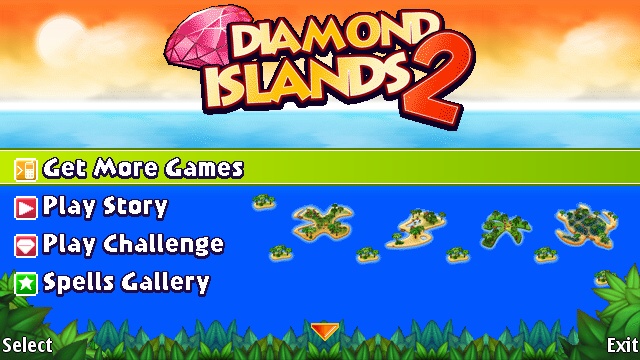
Diamond Islands 2 has a strong pedigree to live up to. Digital Chocolate have, to my mind, developed some great classic games for Symbian smartphones in the past. While I've not seen Diamond Islands (released over two years ago), titles in their "Cafe" series on N-Gage were always must downloads for me. And that reputation makes Diamond Islands 2 an immediate download from the Ovi Store.

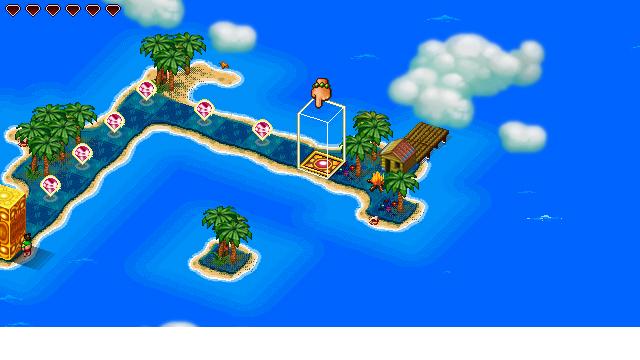
Am I happy with it? Yes I am - and while there are some control issues, this is a spatial puzzle game. It challenges you to rock a totem (possibly a stone idol) around various small islands, picking up jewels as you go before installing the totem, vertically, on the target square.

Simple? Nope, because the only move you have is to "push totem onto another one of its sides", so you'll need to go through some mental gymnastics to work out where you wan to put it, and then implement those ideas. You can't really just roll around and hope it works out, you do need to do some planning. It's not just limited to getting to the exit either, but also picking up all the jewels on each level, hitting switches to raise bridges, and generally doing lots of puzzle type things before you can leave.

Diamond Islands 2

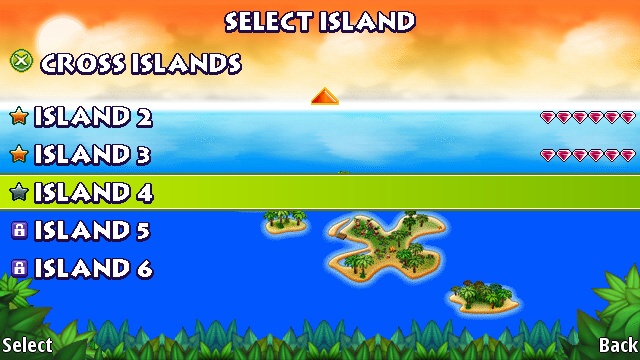
There lies one of the only problems I've found in Diamond Islands 2. The game world is made up of lots of small islands (you can't roll into the water) but in an isometric layout. I've yet to find a smartphone that handles isometric action smoothly - they are always a forced into the "up down left right" model. Digital Chocolate have gone with two control options - slide on the screen, and tilting the device.

Both of them work, although I had accuracy problems with both. It's rare in the game to have a move that is not reversible, so you just rock the totem back if you miss, but it can be a bit annoying until you get the hang of it. The tilt controls don't work on the isometric angles, but on the cardinal "up down left right" directions, which just feels wrong. The touch screen asks you to tap in the direction you want to go - which is a more accurate but... feels wrong. At the same time, it could just be me.

Diamond Islands 2

One thing Digital Chocolate have always been good at are small graphics that carry a lot of detail, and that is true here. With sea shores, switches, shells, palm tree decorations, jewels and more, there's a lot going on and it's a testament to good design that they're never confusing. As to the background music? Let's just say it wouldn't be out of place in a 1970's lift, stuck in the corner of a Hawaiian themed shopping centre in Leeds. It's rather repetitive, in an annoying way!

Control problems aside, Diamond Islands 2 is a nice game. The problem for me is the control issue. Too many mis-interpreted commands rack up the bad kind of frustration, and when accurate moving and placing of your totem is the key to the game, this is a big mistake to me. Your mileage may vary, but it's enough for me to think twice about playing the game.

READ MORE - Chimo NgeBlog : Review: Diamond Islands 2

Friday, August 5, 2011

Chimo NgeBlog : Gadget review: HTC ChaCha


Let's face it, you'll either love it, or hate/be ridiculed for owning a phone by the name of "ChaCha". Then again, it may just be a conversation piece. To its credit, the HTC ChaCha (Dh1,299) is a lot more than that, though.

The ChaCha is an Android-powered phone featuring a full QWERTY keyboard and deep Facebook integration, including a dedicated Facebook button.

With a candy-bar form factor, the phone primarily features a 2.6-inch screen and a four-row QWERTY keyboard. Dedicated "call" and "end" buttons make a comeback on this phone too, something we haven't seen in a while. On the left of the phone is a volume rocker and a USB post, while the right features, nothing! No really, the right side of the phone is all smooth; space that could and should have been used for a dedicated camera button. The top features the power button and the 3.5mm headphone port.

Coming back to the screen, it features a landscape orientation with a resolution of 480x320. If you've been using a full-touch screen phone prior to this, you will definitely notice the lack of screen real estate. As a result, you'll find yourself scrolling a lot more. Of course this isn't a flaw of the device, and rather the feature, or the design.

By design it has reduced the size of the screen to fit the keyboard. They keys are shaped like pebbles and don't take long to get used to. That being said, I did find myself looking at the keyboard and typing rather than looking at the screen. If I didn't, mistakes were made and lives were lost. OK so the former is a lot truer than the latter. The keyboard is great, but it is not the best.

The ChaCha features a modest specification sheet; it isn't trying to be a powerhorse of the a phone. That being said, everything seems to work smoothly on ChaCha without any hiccups. Even high-quality YouTube videos worked perfectly.

The camera on this is a 5-megapixel shooter on the rear with a 0.5-megapixel or VGA on the front. Not going to turn any heads, the camera quite simply gets the job done. You won't find it replacing your actual camera but it serves pretty well for a quick snap.

The ChaCha is powered by Android 2.3 (Gingerbread) featuring its add-on layer of HTC Sense. It's actually an excellent and necessary add on as it re-formats the layout for the smaller screen size, making the phone much more usable than it would have without it.

Probably the most important defining feature of the ChaCha is the Facebook integration. Featuring custom applications for just about all of Facebook's features, including Chat, the ChaCha does deliver what it promises.

A quick press of the Facebook key brings up the application to send in a status update or post a picture. A longer press of the button brings up venues and lets you check in. The dedicated Facebook Chat application works extremely well too.

Those whose social lives overlap with the social network will find few devices better than this. The great keyboard, touch screen and latest Android-powered make the ChaCha a great device. At its price, the ChaCha is an excellent phone with near-perfect Facebook integration that will be its central selling point.

READ MORE - Chimo NgeBlog : Gadget review: HTC ChaCha

Thursday, August 4, 2011

Chimo NgeBlog : Nokia Windows Phone – 10 apps we need to see


The first Nokia Windows Phone, codenamed Sea Ray and running on Windows Phone Mango, will arrive onto the scene with a ready supply of more than 10,000 apps to choose from. However, there are still some major gaps we’d like to see filling – pronto.

Spotify
Spotify is pretty much the hottest property in online music subscription services right now. Having conquered Europe, it’s now wowing our American cousins. If anything, the long wait for a US launch has made Americans even more appreciative of Spotify’s classy qualities – so why no Windows Phone app? Microsoft has already demoed this for Windows Phone Mango, so we hope to see it at launch on our Sea Ray.

Instagram
Instagram has built a considerable following of iPhone photographers, all sharing their best pics for others to see. It also grants users the ability to modify their pictures with funky custom filters for various vintage and way-out looks. Now we just need to see it cropping up on our Nokia Windows Phone, which will doubtless rock a top-notch camera.

Wikitude
Windows Phone may have finally got Layar, but what about that other popular augmented reality app? Wikitude has thus far steered clear of Microsoft’s mobile OS, which is a great shame. Once it appears, you’ll be able to point your Nokia Windows Phone’s camera at any street or landmark and an array of Wikipedia entries, local restaurant information and cash machines locations will appear in the appropriate locations.

Google Maps
Will this ever happen with Ovi Maps set to integrate with Bing Maps on Windows Phone? Maybe not, but never say never – after all, there’s a version of Google Maps on Apple’s iPhone platform. We’d love to see it happen, as Bing Maps is – how shall we put it – not very good. Google Maps, on the other hand, is ace.

BBC iPlayer
The BBC iPlayer app is a thing of beauty on iPhone and Android, with its slick interface, high streaming video quality and – of course – range of quality programs. Come on Beeb – make an iPlayer app for Windows Phone. We want to watching Have I Got News For You in bed on our Nokia Sea Rays this autumn.

Amazon MP3
We understand that Microsoft has its Zune music service to push, but the truth is a lot of people are invested in the Amazon MP3 ecosystem, so it’d be a good idea to get an app up on the Windows Marketplace. If you’ve ever used the Android Amazon MP3 app, you’ll know it’s a thing of simple beauty to use.

Firefox Mobile
Again, we know that Microsoft is keen to funnel people through its own Internet Explorer, but comments made a few months ago suggest that it wouldn’t object to a rival browser being offered on the Marketplace. We’re hopeful that Mozilla will find a way to get back to work on a Firefox browser for Windows Phone Mango, because it’s one of the nicest mobile browsers around.

Google Docs
MS Office on Windows Phone 7 is a beautiful thing, but the truth is that’s just not the way many of us work anymore. An increasing number of people – particularly those who work remotely some or all of the time – work with Google Docs, which allows online storage, sharing and collaboration on documents and spreadsheets. We’d love to see an official app on our Nokia Windows Phone devices.

Adobe Photoshop Express
Being able to resize, crop and edit photos (one of the most demanding task to put your PC through) while on the go is a sign of how far mobile technology has come. Android and iPhone users have been enjoying this brilliant photo editing app – it’s time Windows Phone users got in on the action.

Dropbox
There are plenty of third party Dropbox apps on the Windows Phone Marketplace, but there’s no official app as yet. That’s a shame, because this cloud-based file sharing tool has become invaluable for many people working remotely. It’s one of the best ways to share large files in a secure and speedy way, and a proper mobile app finishes the package nicely. How about a nice new version for our Nokia Windows Phone, eh?

READ MORE - Chimo NgeBlog : Nokia Windows Phone – 10 apps we need to see

Chimo NgeBlog : 4 Top 4G Smartphones


Here are my picks for the best 4G smartphone from each carrier. They each share a number of desirable features, such as huge displays, fast processors, mobile hotspots, HD video capture, and a full suite of software.

AT&T: Samsung Infuse 4G

AT&T's 4G network is a juiced up version of HSPA+ right now. Later, it will graduate to Long Term Evolution 4G in a handful of markets. For now, it is marketing HSPA+ (with enhanced backhaul) as its 4G network.

The best phone available on this network is easily the Samsung Infuse 4G. It's a monster of a phone, with a 4.5-inch Super AMOLED Plus display and dual-core processor under the hood. Its display dazzles, and the attractive (and very thin!) form factor make it an easy phone to recommend. It offers good media tools, such as camera, music, and video players, and its speedy system performance means it can be used for some heavy lifting. About the only downside is its massive size, making it feel like a dinner plate when used to make phone calls. It costs $199.99 with a new two-year contract.

Sprint: Motorola Photon 4G

Sprint's flavor of 4G is WiMax, which it has been expanding across the country with partner Clearwire. While the future of WiMax is a bit uncertain, that's not stopping Sprint from rolling out solid WiMax hardware.

The Motorola Photon 4G, which hits Sprint this week, out-guns its WiMax peers to take the top WiMax spot. Motorola was able to trim some bulk from this handset and still keep a 4.3-inch display with qHD (540 x 960) resolution. The screen looks great, and it is running a 1-GHz dual-core Tegra 2 chipset, which delivers blazing performance. In addition to WiMax, the Photon 4G is a global handset, which means it can be used by the traveling professional in a number of European and Asian countries. This alone gives it a serious leg-up on the WiMax competition within Sprint's stable of smartphones. It costs $199.99 with a new two-year contract.

T-Mobile: HTC Sensation 4G

Similar to AT&T, T-Mobile is also marketing HSPA+ as 4G. T-Mobile is rolling out speed upgrades to its HSPA+ network at a regular clip, with many markets already upgraded to 21 Mbps and a handful to 42 Mbps. Along with the network upgrades, T-Mobile has steadily rolled out new phones to make use of those speeds.

Leading T-Mobile's HSPA+ pack right now is the HTC Sensation 4G. This powerful handset from HTC has a 4.3-inch qHD (540 x 960) Super LCD and a 1.2-GHz dual-core SnapDragon processor. Aiding the solid hardware is great software from HTC in its Sense 3.0 user interface overlay. HTC's software delivers a great experience and makes what would be a good phone a great phone. Wireless data speeds are fast, the camera works well, and it has top-notch construction and materials. It costs $199.99 with a new two-year contract.

Verizon Wireless: HTC Droid Thunderbolt

Verizon Wireless is deploying a nationwide Long Term Evolution 4G network as we speak. It is already available in 102 markets, and will reach 175 by the end of the year. It is blazing fast when it comes to broadband speeds, and will anchor Verizon's services for probably a decade or more.

Verizon is offering three LTE-equipped phones right now, and HTC's Droid Thunderbolt is the best. HTC did a commendable job in delivering Verizon's first LTE handset, which has a 4.3-inch display, 1-GHz processor, 8-megapixel camera, and solid 3G/4G data performance. This device also has HTC's Sense 3.0 user interface, which makes is a joy to use. Everything about the Thunderbolt is top notch. It costs $249.99 with a new two-year contract.


READ MORE - Chimo NgeBlog : 4 Top 4G Smartphones

Wednesday, August 3, 2011

Chimo NgeBlog : 4squick: a new foursquare client for Symbian^3


An update was released yesterday for the official foursquare Symbian app, but the results were, to say the least, underwhelming (the rash of angry one-star app reviews tells the story). Despite a video showing updated features coming to the platform, foursquare says this lackluster version is what Symbian users can expect, at least for the “near future.”

Luckily, a new third-party application for Symbian^3, 4squick, is in development. In just its second preview release, it already covers most of the features of the official app and more features are promised soon. Unlike the official app, it’s built in QT/QML, so it’s light and fast.

According to a post on the 4squick site, the new version (0.7175; released earlier today) brings the following changes from the initial release (which is featured in the video above):

  • App startup time is now faster than ever
  • Public/private check-in
  • Share check-in to Facebook and Twitter
  • Leaderboard
  • User profiles
  • Multiple bug fixes and minor details here, there and everywhere

If you’re on the Symbian^3 platform, give 4squick a try and let us know what you think in the comments. Following yesterday’s disappointing update, it appears 4squick should be just what the doctor ordered for many of you.

READ MORE - Chimo NgeBlog : 4squick: a new foursquare client for Symbian^3

Tuesday, August 2, 2011

Chimo NgeBlog : Helpful tips for using Google's Chrome browser

Google's Chrome browser has taken the web world by storm. It quickly established itself as a bona fide competitor to Firefox, Internet Explorer and other browsers.

Chrome is truly a powerhouse among browsers and here are some tips to help you get the most out of it.

1. Multiple home pages - Click the wrench icon and go to Tools then Basics to have more than one site open when you start your browser.

2. Check your tabs - If you think a tab is misbehaving and sucking up a lot of resources, just hit Shift+Esc to open Chrome's task manager. You check your tabs and close any that are using too many resources.

3. Turn web pages into app shortcuts - App shortcuts will open in a browser window without browser buttons. This is handy for sites like Gmail, YouTube, etc. Click the wrench icon, then tools then create application shortcuts and hit the creat button.

4. Back button navigation - If you've gone a way into a site there's an easier way to find your way back. Click the back button and hold it to see a list of pages you've viewed. This is much faster than just clicking the back button over and over again to navigate backwards.

5. Edit a site's code - If you've ever thought you could do a better job coding somebody's site, this feature is for you. Right click on a page and select inspect element. You can make changes to the code that will only be visible in your browser.

READ MORE - Chimo NgeBlog : Helpful tips for using Google's Chrome browser

Monday, August 1, 2011

Chimo NgeBlog : [Review] Fujitsu F-07C the first real Windows Phone 7?

[Review] Fujitsu F-07C the first real Windows Phone 7?

Face it Microsoft lost the Mobile war and despite its effort the company still have a lot to catch-up! Don’t take this the wrong way but even if Mango is a nice update, Windows Phone 7 came two years too late with fewer noticeable change to make it a worthy competitor to both Android and iOS smartphones.
So while many manufacturers moved away and went “Android” Crazy, Fujitsu decided by itself to fix once and for all this Windows Phone 7 fiasco and build-up the F-07C, the first TRUE phone capable to run Windows 7.

The F-07C has been introduced for the first time early may in Japan during a Docomo Press conference. Only available via NTT’s Docomo network the F-07C is a phone like no others that comes powered by an 600MHz Intel ATOM CPU with 1GB of RAM runs on Symbian and a virtualized version of Windows 7. Yep there is no dual boot here, but thanks to the wonders of virtualization, Fujitsu was capable to offer a fully functional Windows 7 OS into a tiny little Symbian phone.

First Impression

The F-07 is not what we can call, “compact”, I mean, sure if you compare the F-07C with any other Windows 7 Netbook this new “Smartphone” is way smaller than anything you can compare it with, but with a size of 125x61x19.8mm and 218g, the F-07C is by far one of the bulkiest smartphone available nowadays in Japan. Still, no pain no gain the F-07 is the only ATOM powered Smartphone we know of in Japan and the only one capable to run Windows 7.

Once you get used to the size of the F-07C you have to admire the amazing work that Fujitsu and its team of engineers has made. The F-07C is a pure technical marvel, extremely well build, and solid with zero tolerance for second-guessing the F-07C show how goods are Japanese when it comes to build compact devices and how ahead they are in the area.

But like usual, Fujitsu did not come with a simple “smartphone” and decided to bring the full Windows Experience by adding one of the most compact QWERTY keyboard I had the chance to play with. Designed to be mainly used with both thumbs, the F-07C keyboard is surprisingly quite easy to get along with, and typing a short mail or entering a url with it is rather unpainful.

Still the most frustrating part of this keyboard is definitively its “tiny” little trackball that is quite difficult to master and prompt to sudden burst of unimaginable frustration forcing you to quickly give-up using it and jump on the F-07C 4” SVGA touchscreen whenever you need to point and click.

Intended to replace your laptop on the Go, Fujitsu had the brilliant idea to offer with its F-07C a nice little “Desktop Kit” including a USB Mouse and Keyboard as well as a docking station that will let you connect your F-07C to any external Display via HDMI as well as offering you four, really needed, USB port.

Here as well nothing much to complain about, the docking station is compact enough to be carried around and if you are not too crazy about Fujitsu USB Mouse & Keyboard combo you can also choose your very own and even invest in a nice Logitech Wireless Combo.

Everyday Usage

Before we are going to move on one of the most important part of this review I will have to warn you that we are not going to spend anytime on reviewing the “Symbian” part of this phone. There is actually nothing really here to talk about and the “Dumb” phone side of the F-07C works pretty much like any other Symbian powered phones available worldwide, so instead of wasting any further time, let’s jump directly on the “Netbook” part of the F-07C.

When for the first time you power-up your F-07C you will be immediately thrown to the rather dull and boring Symbian experience (can’t wait for Symbian death), but thanks to a tiny little button placed on the side of your phone you have the choice to swap between OS and jump from Symbian to Windows 7.

As I said earlier, the F-07C does not offer a real Dual Boot experience but the F-07C will in fact run a virtual Windows 7 Machine on its Symbian OS. While this process is in fact totally transparent for the user, it makes however a huge difference when you are swapping from one OS to an another giving you an almost seamless experience whenever you have to jump between both of them.
Still to achieve such “bliss” you will have to boot Windows 7 like on any other devices and as you would have guess, running on a 600MHz CPU, the F-07C is rather “slow” to boot-up. Still, the F-07C once fully loaded is rather snappy, or as snappy as you could get with such entry level CPU.

Being limited to the rather small size of the screen, you will quickly find yourself doing basic tasks like checking your email, view attached PDF, Excel or Word files, surf the web, Chat online, Update your Facebook profile page and even edit a few docs, but not much.

Having the F-07C with me for about a week, I tired to force myself to dump my iPhone for a while and only the F-07C as my only device, and to be honest, it did not really work for me. And despite what you may believe, the most frustrating things that made me to turn back to my iPhone was the F-07C tiny 4” SVGA screen, that is way enough for the average smartphone but way too small for your basic Windows 7 needs.

Once at home I also tried to “work” with the F-07C for a while by installing the tiny F-07C on its docking station hooked-up to one of my screen.

I knew here as well that I should not expect much, after all the F-07C is a rather underpowered PC, but I was not expecting so much frustration here neither. Don’t get me wrong I knew what to expect, but once plugged to a real screen with a Keyboard and a Mouse you quickly forget that you are working on a Mobile Phone and expect the F-07C to behave as well as any other Nettop or Netbook available on the market.

Add to this the rather disturbing fan Noise that your F-07C will continuously make once plugged on its cradle, the fact that it cannot even handle the most basic DivX movie you are throwing at it and you quickly realize that despite its amazing build quality and impressive achievement of being the first phone to run Windows 7, the F-07C will only be able to offer you a very limited “Windows” experience destroying my dream to get a really capable working station away from home.

Now if you wonder how the F-07C handle Microsoft Office Suite, I’ll say that it will of course let you open four DOCX, XLSX and other MS Office files but don’t even think having Outlook and Word open at the same time, same is true for pretty much everything, the F-07C is only capable to handle correctly one thing at a time killing all hope for multitasking addicted people like myself.

Now, there is the question about Battery life, yep, the F-07C is a greedy little buddy and it will only be capable to run Windows 7 for an hour and half on the go, which is, all things considered, not that bad at all. In an hour and half a lot can be done, but running out of juice so quickly when the F-07C is your only phone could become quickly annoying.

Another little problem I ran into was the rather stubborn Wi-Fi module that Fujitsu installed on the F-07C that would not connect to certain WPA2 access point, weird but really annoying.

Conclusion

Well this is a though one, I mean, yeah the F-07C is not as amazing as one’s could expect and it definitively need a better tweaked Windows 7 installation for a snappier experience by first removing all pre-installed crap like Norton for example. But the F-07C is also an impressive little device, I mean where can you find a totally autonomous Windows 7 compact PC with 3G and WiFi that can fit in your pocket and just weight 218g?
No really when you think about it, the F-07C is a really impressive piece of engineering and you have to admire the work that has been done here, but against an iPhone or an Android Smartphone, the F-07C have a lot of difficulty to justified itself.

READ MORE - Chimo NgeBlog : [Review] Fujitsu F-07C the first real Windows Phone 7?

Sunday, July 31, 2011

Chimo NgeBlog : 5 things Google+ does better than Facebook and Twitter


Google+ has only been active for a month, and tech enthusiasts can’t seem to get enough of it. While Google is still trying to figure out exactly how to approach social correctly, the network has built enough buzz to attract a reported 20 million users. While this doesn’t compare to Facebook’s staggering 750 million users or Twitter’s sizable 200 million users, those networks have been around much longer.

Several of us on the VentureBeat staff have immersed ourselves into the Google+ ecosystem to see what it has to offer. Thus far we’ve come to generally enjoy the service and noticed a few strengths it has over Facebook and Twitter, especially in the realms of privacy and video chat.

Here are five features we’ve seen that we like in Google+ more than Facebook and Twitter:

1. Circles

One of the most talked about Google+ features (and for good reason) is Circles, the feature that allows you manage the people you follow and want to share updates with. With Circles, you can send status updates to groups it is relevant to only, rather than blasting it out to everyone. For example, I created a Circle for just friends of mine that love music so I could share music videos that I have created or really enjoyed.

Facebook and Twitter do offer ways to share updates selectively but it’s not as fine-tuned. I can block updates from certain groups on Facebook but to actually configure that takes time. For Twitter, it’s all or nothing with your updates as you can make your profile private or public.

2. Hangouts

Another often cited feature for Google+ is Hangouts, which let you video chat with up to 25 people at the same time for free. Every person you’re chatting with appears in a small box and whoever is speaking is in a large window on top.

While Facebook recently partnered with Skype to bring video chat to Facebook users, it only supports one-on-one video chat. Facebook CEO Mark Zuckerberg hinted that more features were coming down the pipeline, but right now Google+ is the champion of video chat. Twitter, unfortunately, does not have a video chat option.

3. Mobile capabilities

Google+ so far has released apps for Android and iOS, and both offer much to users on the go. Outside of the basic functionality like reading updates and watching videos, there’s also a group chat feature called Huddles. Unlike apps from Facebook and Twitter, this allows you to chat with many friends at once to make plans or waste time.

While I think Twitter’s mobile presence is generally excellent, the limitations of the network’s core features hinder what can be done on mobile devices. Facebook’s mobile applications are fine for reading updates and sending messages, but it could use an overhaul to keep up with Google+.

4. Data downloading

Google+ is the first prominent network to offer the ability to download your personal data and updates easily. Google’s new Google Takeout service lets you download your saved data from Google’s servers. If you wanted to leave Google+ tomorrow, for example, you could easily download your status updates before checking out.

At this time, Facebook and Twitter offer no comparable service.

5. Sparks

Sparks might be one of the most underutilized features in Google+. The feature lets you find content like articles and videos related to any topic you can think of. At the bottom of each peice of content is a Share button that makes it easy to show it to those in your circles.

It’s easy to miss the small “Sparks” link on the left side your Google+ stream and at first click, it seems like the feature is narrow. It highlights interests like Cycling, Fashion, Recipes, Sports cars, Android, and Robotics. But above the highlights is a search bar that pulls up anything you might want. I searched for “Harry Potter” and found entertaining blog posts published today and YouTube videos uploaded this week.

Both Facebook and Twitter don’t make it this easy to find and share content. Both competing networks make you stumble across content from someone else’s steam or look outside the network for new things to share.

Wrap Up

While Google+ still has much to do if it wants to catch up to the popularity of Facebook and Twitter, it’s made many steps in the right direction. The above standout features already show how Google is making some smart decisions. They’ve also already made missteps like booting users off for “fake name” or “community standards” violations. Facebook and Twitter are surely watching closely and will make their own feature additions to keep up.

Are there any other things you think Google+ does better than the rest? What things do you wish Google+ did better?

READ MORE - Chimo NgeBlog : 5 things Google+ does better than Facebook and Twitter